


Gaming-Grade RAM — Zero FPS Drops

Gaming Laptop RAM Upgrade in IC Colony

Stop FPS drops, stuttering, and slow loading screens. Upgrade your gaming laptop RAM in IC Colony to 16GB, 32GB, or 64GB — optimised for high-speed dual-channel performance. We service ASUS ROG, MSI, Acer Nitro, Lenovo Legion, HP Omen, and all gaming brands.

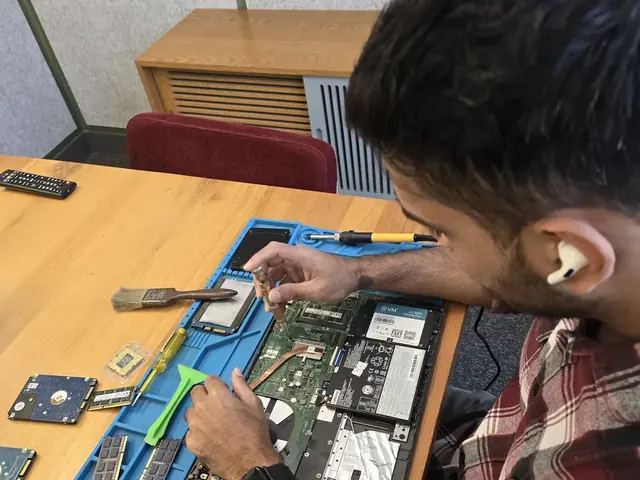
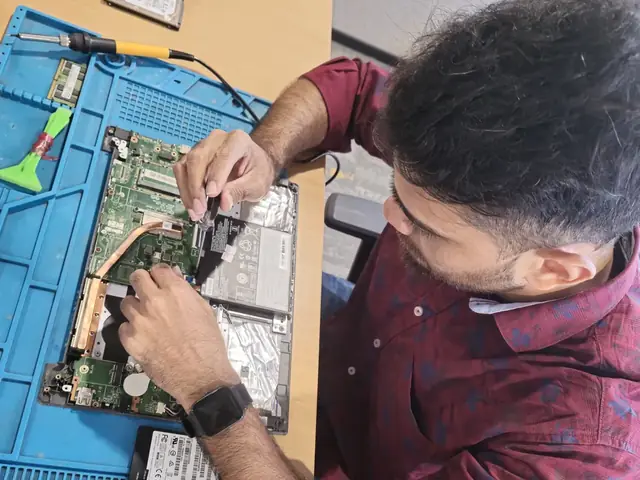
Technician with a screwdriver over an opened laptop, RAM modules and hard drives on the repair mat Technician working inside an opened laptop with RAM modules and an SSD laid out beside it
Xigox technicians at the repair bench

Why Gaming Laptop RAM Upgrade Matters in IC Colony

Modern games demand 16–32GB. Insufficient RAM = stuttering, texture pop-in, and FPS drops.

Eliminate FPS Drops

Games like Fortnite, Warzone, GTA V, and Cyberpunk 2077 use 10–14GB RAM. With 8GB, Windows pagefile causes micro-stutters. 16–32GB eliminates this.

Faster Loading Times

More RAM means game assets (textures, maps, shaders) stay pre-loaded in memory instead of streaming from SSD, cutting loading screens by 30–50%.

Stream While Gaming

Running OBS/Streamlabs + game + Discord + Chrome simultaneously needs 20GB+. Upgrade to 32GB for butter-smooth streaming.

Enable High Textures

Ultra/High texture settings load large assets into RAM. With 16GB+, you unlock texture quality settings that were grayed out or caused crashes before.

Gaming Laptop RAM Upgrade Process in IC Colony

Matched dual-channel kits, XMP profiling, and FPS benchmarking included.

1

Gaming Profile Assessment

Tell us your laptop model and games you play. We check RAM type, current FPS bottleneck, and upgrade headroom.

5 min
2

Matched Kit Sourcing

We source a dual-channel kit (same brand, speed, CAS latency) — critical for gaming performance. No mismatched sticks.

In stock
3

Expert Installation

Anti-static installation. We seat both modules correctly for dual-channel, verify in BIOS, enable XMP profile.

20 min
4

FPS Benchmark Test

We run your game(s) before/after and show you the actual FPS improvement. Share the benchmark screenshots.

15 min

Gaming Laptops We Upgrade in IC Colony

ASUS ROG Strix / Scar / Zephyrus
DDR4/DDR5 SODIMM — 2 slots on most Strix/Scar, 1 slot + soldered on Zephyrus G14
ASUS Gaming
MSI Raider / Katana / Stealth
DDR4/DDR5 depending on generation. Raider: 2 slots. Stealth: may be partially soldered.
MSI Gaming
Lenovo Legion 5 / 7 / Pro
DDR4/DDR5 with 2 user-accessible SODIMM slots. Popular in IC Colony
Lenovo Gaming
HP Omen / Victus
DDR4/DDR5, 2 SODIMM slots on Omen. Victus may have 1 slot + 1 soldered.
HP Gaming
Dell G15 / Alienware
Alienware m15/m17: 2 DDR5 slots. Dell G15: 2 DDR4 slots. Full upgrade support.
Dell Gaming
Acer Nitro 5 / Predator
Nitro 5: 2 DDR4 slots, budget gaming favourite. Predator: DDR4/DDR5, 2 slots.
Acer Gaming
ASUS TUF Gaming
TUF A15/F15: DDR4, 2 user-accessible slots. The most common budget gaming laptop in India.
Budget Gaming
MSI Gaming Laptops
Katana, Cyborg, Stealth: DDR4/DDR5, 2 SODIMM slots. Full upgrade support.
MSI
Custom-Built Gaming Desktop
4 DIMM slots, DDR4/DDR5, XMP support. On-site visit for desktops in IC Colony
Desktop

Brands

Gaming Laptop RAM Upgrade — All Brands in IC Colony

We carry high-speed gaming RAM kits optimised for every gaming brand.

Prices

Gaming RAM Upgrade Prices in IC Colony

Matched dual-channel kits. XMP/EXPO profiling included. Free pickup & delivery.

Repair typeStarting priceExpected FPS Gain
16GB RAM Upgrade₹8,999 - ₹13,99915–25% FPS
32GB RAM Upgrade₹16,999 - ₹25,99925–40% FPS + streaming

From our price list; the exact price depends on the model and the fault. ₹350 inspection fee, credited to the repair if you go ahead.

Reviews

What Customers Say About Gaming Laptop RAM Upgrade in IC Colony

Reviews from IC Colony customers who used our gaming laptop ram upgrade service

“Booked Samsung RAM Upgrade for my Samsung Galaxy Book4 Pro online. Doorstep pickup and clear communication throughout.”
Vikram Oberoi Mulund
“Needed Fujitsu Touchpad Replacement for my Fujitsu laptop — Xigox technicians handled it professionally with a warranty.”
Devansh Gupta Borivali
“Booked Samsung Keyboard Replacement for my Samsung Galaxy Book3 360 online. Doorstep pickup and clear communication throughout.”
Yash Chauhan Juhu
“Fujitsu SSD Upgrade on my Fujitsu laptop was completed same day with fair, transparent pricing.”
Sanjana Rao Bandra
“Booked Samsung Battery Replacement for my Samsung Galaxy Book4 online. Doorstep pickup and clear communication throughout.”
Priya Menon Chembur
“Needed Samsung Keyboard Repair for my Samsung Galaxy Book4 Pro — Xigox technicians handled it professionally with a warranty.”
Tanvi Bhatt Goregaon

Customer stories

Customer Stories

What customers say about their laptop and computer repairs

“Laptop fan was making grinding noise during gaming. Xigox replaced both fans and did a full thermal cleanup. Silent and cool now.”

ASUS ROG Zephyrus G14

V Vishal Gupta Andheri
“Dropped my MacBook Air and the screen cracked. Xigox replaced the Retina display with genuine parts. Flawless display quality restored!”

MacBook Air M2

K Karan Oberoi Bandra
“MacBook Pro wouldn't charge. Turned out to be a faulty USB-C port. Xigox repaired the port at the chip level. Charges perfectly now.”

MacBook Pro 16 M3 Pro

I Isha Malhotra Juhu
“Logic board failure — Apple quoted ₹65,000 for replacement. Xigox did chip-level repair for a fraction of the cost. Saved me a fortune!”

MacBook Pro 14 M2

D Dev Kapoor Powai
“Charging port was loose and wouldn't charge. Xigox replaced the DC jack and power board. Charges perfectly now, even fixed a minor hinge issue for free!”

Acer Aspire 5

V Varun Nair Thane
“My gaming laptop's keyboard backlight stopped working. Xigox replaced the keyboard with a genuine RGB one. Looks even better than before!”

Acer Nitro 5

T Tanvi Kulkarni Vile Parle

Gaming Laptop RAM Upgrade in IC Colony — Performance Guide for Gamers

If you're a gamer in IC Colony experiencing stuttering, texture pop-in, or FPS drops in modern titles — your RAM is likely the bottleneck. Modern AAA games in 2026 recommend 16GB minimum, with titles like Star Field, Cyberpunk 2077, and Alan Wake 2 actively using 12–14GB during gameplay. If you're gaming with 8GB, you're leaving significant performance on the table.

Why Dual-Channel Is Critical for Gaming

A single 16GB stick gives you capacity, but two 8GB sticks in dual-channel mode double your memory bandwidth. This is measurable in GPU-bound games: dual-channel DDR4-3200 delivers ~50 GB/s vs single-channel's ~25 GB/s. The result? 5–15% higher average FPS and dramatically fewer 1% low FPS drops (the stutters you actually feel). We always install matched dual-channel kits for gaming setups.

XMP/EXPO — Unlocking Advertised Speed

Most high-speed RAM kits ship with XMP (Intel) or EXPO (AMD) profiles — overclocking settings certified by the manufacturer. Without enabling these in BIOS, your DDR4-3200 might run at DDR4-2133 (base JEDEC speed). Our technicians enable the correct profile during installation and verify the actual running speed in CPU-Z.

Gaming RAM + Thermal Paste Combo

If you're opening a gaming laptop for RAM, it's the perfect time to repaste the CPU/GPU with high-quality thermal compound (Thermal Grizzly Kryonaut). This can drop temperatures by 10–15°C, reducing thermal throttling and unlocking even more FPS. We offer a combo discount: RAM upgrade + thermal repaste together saves ₹200–500.

Service for Gamers in IC Colony

Free doorstep pickup, matched dual-channel kits in stock, XMP/EXPO activation included, FPS benchmark before and after. Serving all of IC Colony — 7 days a week. Upgrade your gaming experience today.

Gaming Laptop RAM Upgrade — IC Colony, Mumbai

Matched dual-channel kits for ROG, MSI, Legion, Omen, Alienware. FPS benchmark included. Pincode: 400092.

Get FPS Boost Quote

FAQ

Gaming Laptop RAM Upgrade in IC Colony — Frequently Asked Questions

16GB is the minimum for modern gaming. 32GB is recommended for AAA titles, streaming while gaming, and future-proofing. 64GB is for professional content creators who also game. We recommend 32GB for most gamers in IC Colony.
If you have 8GB, upgrading to 16GB+ can eliminate stuttering and increase 1% low FPS by 20–40%. With 16GB already, going to 32GB helps in open-world games and when streaming. Consistent frame times matter more than peak FPS.
DDR4: 3200MHz is the sweet spot. DDR5: 5600MHz for best value, 6400MHz for enthusiasts. We match the speed your laptop's memory controller supports for optimal performance.
Yes! We service all gaming laptops: ASUS ROG Strix/Zephyrus, MSI Katana/Raider/Stealth, Acer Nitro/Predator, Lenovo Legion, HP Omen/Victus, Dell G-Series, Razer Blade, and more.
Most gaming laptops have 2 SODIMM slots and support 32GB or 64GB max. Models like ASUS ROG Strix, MSI Raider, and Lenovo Legion Pro support 2×32GB = 64GB. We check your specific model.

More Services in IC Colony

Areas, Roads & Landmarks We Cover in IC Colony

Free pickup & drop across all these neighbourhoods

Localities & neighbourhoods

  • Borivali West
  • Borivali

Roads & highways

  • IC Colony Road

Landmarks & famous places

  • Infant Jesus Church
  • Borivali Station
  • National Park Gate

Gaming Laptop RAM Upgrade in IC Colony — Nearby Areas

We also serve these locations near IC Colony

Comparison

Xigox vs Local Gaming Laptop RAM Upgrade Shops

What you get with Xigox in IC Colony, side by side.

FeatureXigoxOther shops
Experienced Technicians Trained & VerifiedVaries; ask who will work on the device
Genuine / OEM Parts GuaranteedVaries; ask which part will be fitted
90-Day Warranty Written CertificateVaries; ask for the warranty in writing
Free Doorstep Pickup IC Colony — FreeVaries; ask whether pickup is free
Same-Day Service IC Colony — AvailableVaries; ask for a time in writing
₹350 Inspection (refunded if you proceed with repair) ₹350, credited to the repairVaries; ask what the diagnosis costs
Transparent Pricing Fixed Quote — No SurpriseVaries; ask for a written quote first
Live WhatsApp Updates Real-time Repair StatusVaries; ask how you will get updates

Xigox charges ₹350 for inspection — credited to your repair cost if you go ahead.

Guide

Gaming Laptop RAM Upgrade in IC Colony — Complete Guide

Why waste time on aggregators? Get direct service without middleman markup with Xigox. A gaming PC that won't boot, frame drops, or overheating during gameplay in IC Colony — these require a technician who knows gaming hardware. Xigox's gaming repair team identifies whether it's a GPU issue, VRM failure, or thermal problem — fixing only what's broken. That's the standard Xigox holds for Gaming Laptop RAM Upgrade in IC Colony — free doorstep pickup, a transparent quote in writing, genuine-grade parts, and a 90-day warranty once the Gaming Laptop RAM Upgrade is complete.

Express Gaming Laptop RAM Upgrade — What to Expect

Wondering how fast Xigox can complete repair in IC Colony? Our standard process: First — call or WhatsApp +91 74997 61196 and our pickup technician reaches you within 2 hours. Then — ₹350 diagnostic pinpoints the issue. Step 3 — you approve the quote via WhatsApp — zero pressure. Step 4 — this repair is done using OEM-grade components by our engineers, usually within 2–4 hours. Step 5 — your gaming laptop is delivered back to your IC Colony address with a quality report.

Transparent Pricing Policy for Gaming Laptop RAM Upgrade

One of the most common complaints about repair shops in IC Colony is hidden charges after the job is done. Xigox operates differently. Prior to touching your gaming laptop, our technician sends a WhatsApp quote covering parts and labour. There is zero ambiguity — the decision is entirely yours. The ₹350 diagnostic is credited 100% when you approve the repair.

Serving IC Colony Homes & Offices

Customers from IC Colony with free pickup and drop. Every job gets a written quote before any work, genuine parts and a 90-day warranty, whether it is one laptop or an office fleet. By trusting us for this repair in IC Colony, your device is repaired at our Virar West workshop and returned tested.

Urgent Gaming Laptop RAM Upgrade Now

Can't wait 48 hours? We provide rush this job in IC Colony for urgent situations. Whether you have an important client meeting and your gaming laptop just stopped working, our priority service guarantees completion within 4–6 hours. Priority repairs are available 7 days a week in IC Colony. Simply mention 'URGENT' when booking and we'll prioritise your job immediately.

OEM-Grade Solutions for Gaming Laptop RAM Upgrade

Reliability matters for this repair. That's why our technicians exclusively use original-specification parts for your gaming laptop. Rather than counterfeit components, we source from established suppliers. This ensures your repair is durable, backed by our written 90-day warranty.

Quick & Hassle-Free Gaming Laptop RAM Upgrade in IC Colony

We know your time is valuable in IC Colony. Xigox plans this job for rapid turnaround. In 90% of cases, our technicians complete the job on the same day. Our team offers free doorstep pickup from your IC Colony address, execute the repair at our workshop, and return it to you.

Post-Repair Support for Gaming Laptop RAM Upgrade

Every repair completed by Xigox in IC Colony comes with a documented three-month warranty on parts and labour. That means, if anything goes wrong within 3 months, we fix it at zero extra cost. You get a written warranty card every single time, so the terms are clear.

Affordable Gaming Laptop RAM Upgrade in IC Colony

Premium job doesn't have to be expensive in IC Colony. By optimizing our repair processes, we offer savings of up to half the cost compared to official repair outlets. You get the same OEM components for your gaming laptop, without the massive markup. Request a price estimate for this job in IC Colony today.

Chip-Level Gaming Laptop RAM Upgrade in IC Colony

Replacing an entire board is often unnecessary than fixing the fault on it. Xigox's in-house micro-soldering lab means engineers diagnose the exact failing IC and replace only that component — a fraction of full board replacement. IC Colony residents come to Xigox specifically for this.

Experienced Technicians for Gaming Laptop RAM Upgrade in IC Colony

Not all shops in IC Colony has the skills for complex this job. Our technicians undergo rigorous training dealing with gaming laptop hardware. From basic part swaps to complex micro-soldering, we handle it all right here for IC Colony clients.

Your gaming laptop is an investment — keep it running with a trusted Gaming Laptop RAM Upgrade service. Xigox serves homes and offices across the region with honest quotes. Ready to get started? Reach us at +91 74997 61196 for instant Gaming Laptop RAM Upgrade in IC Colony.

Gaming Laptop RAM Upgrade in IC Colony

Free pickup · Same-day service for most repairs · 90-day warranty

Open every day, 9 AM – 9 PM · Serving IC Colony, Mumbai

Explore more services

More Repair & Tech Services Near IC Colony

Same technicians · Free pickup · 90-day warranty across all services.

How it's done

How We Perform Gaming Laptop RAM Upgrade

What our technicians do, what it requires, and how to tell you need it.

1 How It's Performed

When you want more capacity or speed rather than just a fix, our technicians check what RAM type, speed, and maximum capacity your exact motherboard actually supports before ordering anything — fitting faster-than-supported RAM just has it run at the board's lower supported speed, so matching specs correctly avoids wasted spend.

Typical time: 15–30 minutes

2 What This Requires

  • Confirmation of how many RAM slots your model has and whether they're user-accessible or soldered — some ultrabooks have some or all memory soldered to the board, which changes what an "upgrade" actually involves.

3 When You Need This

  • Frequent blue screens or random restarts, especially under multitasking or heavier workloads.
  • The system reports less RAM installed than you know is fitted (a sign of a dead or unseated module).
  • Performance feels sluggish specifically when many apps/tabs are open at once, improving when you close them — a classic insufficient-RAM symptom.

Service area

Gaming Laptop RAM Upgrade in IC Colony — Service Area & Coverage

Xigox provides gaming laptop ram upgrade across IC Colony (PIN 400092), in the Mumbai Suburban district of Mumbai. Our doorstep pickup and on-site service cover the entire IC Colony area and the neighbourhoods around it.

Localities we cover in IC Colony: Borivali West, Borivali. Wherever you are in IC Colony, we can collect your device from your door and bring it back after the repair.

Our technicians regularly serve homes, societies and offices around Infant Jesus Church, Borivali Station and National Park Gate, and along IC Colony Road. If you're near any of these landmarks, same-day pickup for gaming laptop ram upgrade is almost always available.

Gaming Laptop RAM Upgrade near IC Colony

We also serve these nearby areas — tap your locality for local gaming laptop ram upgrade:

Gaming Laptop RAM Upgrade price in IC Colony — know it before you book

  1. 1Pick your device & issue
  2. 2See the real price range
  3. 3Free doorstep pickup in IC Colony

4.9 from 9,727 customer reviews across all repairs · upfront pricing · 90-day warranty

Before you book: have your device model and a quick description of the issue ready — it speeds up your quote.

Nearest pickup point: Borivali West

~1.3 km from IC Colony. With free doorstep pickup you don't need to travel — this is our nearest pickup point.

Call WhatsApp