
Gaming
PC RTX 4080
- Issue
- No display output, fans spinning. No boot sequence.
- Solution
- Diagnosed motherboard failure. Replaced with compatible board.
Goregaon West
4 Hours
- Motherboard
- Gaming
- Display
 Dell · Computer Beeping On Startup · Andheri
Expert diagnosis & repair for Computer Beeping On Startup on your Dell device in Andheri. Free doorstep pickup, genuine parts & 90-day warranty.
Open 9 AM – 9 PM · 7 days · ₹350 inspection fee (refunded if you proceed with repair)
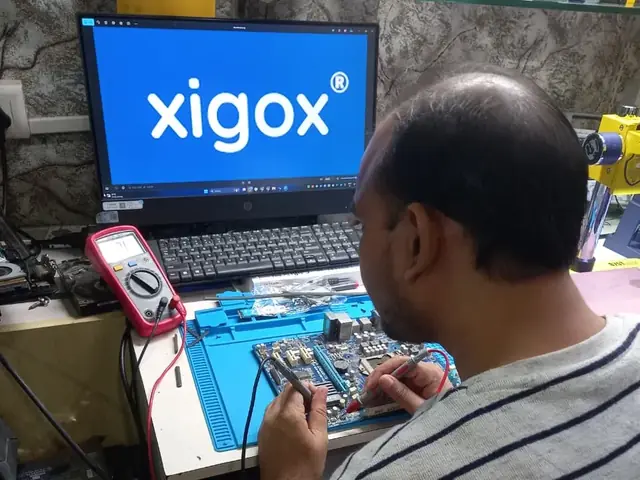
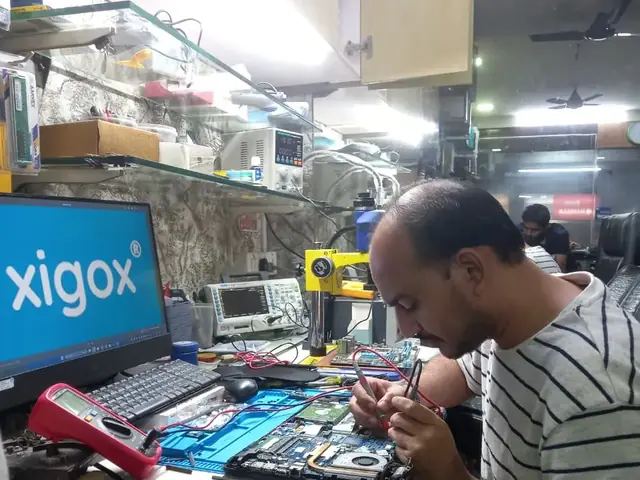
Common symptoms of Computer Beeping On Startup on Dell devices. Recognise 2 or more? Book a ₹350 inspection (refunded if you proceed with repair) now.
Laptop clearly shows signs of Computer Beeping On Startup
Normal laptop performance significantly impacted
Issue worsening progressively with continued use
Standard user troubleshooting has not resolved it
Laptop has become unreliable for daily work
Risk of further hardware damage if left unaddressed
Don't Delay — Computer Beeping On Startup Gets Worse Over Time
Unaddressed hardware issues worsen and can lead to secondary damage, escalating repair costs significantly.
Knowing the root cause ensures a precise repair — not just a temporary fix.
Accidental drops, pressure or impact causing mechanical damage to internal components.
Water, beverages or humidity causing short circuits or corrosion on circuit boards.
Components degrade naturally with regular use — batteries, connectors and hinges most affected.
Factory faults that surface after the warranty period in certain production batches.
Transparent pricing · ₹350 inspection fee (refunded if you proceed with repair) first · Pay only after approval
| Repair Type | Estimated Cost | Warranty |
|---|---|---|
| Boot Record Repair | ₹549 - ₹1,199 | 1 Month |
| Boot Record Repair | ₹549 - ₹1,199 | 1 Month |
| Advanced Boot Fix | ₹1,199 - ₹2,099 | 3 Months |
| Advanced Boot Fix | ₹1,199 - ₹2,099 | 3 Months |
| OS Recovery + Boot Fix | ₹1,699 - ₹3,199 | 3 Months |
| OS Recovery + Boot Fix | ₹1,699 - ₹3,199 | 3 Months |
Final cost confirmed after ₹350 inspection (refunded if you proceed with repair). Work starts only with your approval.
Get Exact QuoteWhy Us?
With 1,00,039+ successful repairs and a 4.9-star rating, Xigox is an independent Dell repair specialist serving Andheri. Conveniently located near S.V. Road.
₹350 inspection fee (refunded if you proceed). Written quote before any Dell Computer Beeping On Startup work begins.
If we cannot resolve your Dell Computer Beeping On Startup issue, you pay nothing beyond the inspection fee.
We repair Dell hardware at chip and board level where it's safe to do so — often a fraction of a full-module swap.
Our engineers work on Dell hardware regularly. Every repair is tested before return.
We use genuine Dell parts wherever available; otherwise OEM-compatible components.
Every repair backed by a written 90-day warranty. Same fault recurs? We fix it free of charge.
Since 2011
9,727+ reviews
Parts & labour
For common issues
₹350 inspection fee
15+ yrs in Mumbai Suburban
Who repairs your device
Your Dell is handled by Xigox technicians from start to finish. It is never handed on to another shop. Work that needs the repair bench is done at our workshop in Virar West.
Board-level faults are traced with a microscope, a multimeter and a soldering station before any part is replaced, and parts are fitted only after you approve the quote.
We don't open your personal files during a repair. When a job needs access to your data, such as data recovery or a Windows reinstall, we ask you first.




Step-by-step from booking to delivery — complete transparency, no surprises
Call, WhatsApp or book online. Tell us about the Computer Beeping On Startup on your Dell desktop computer in Andheri. No technical expertise needed.
We pick up your Dell desktop computer from your Andheri address at no transport cost. Bring it to us or we come to you.
A Dell specialist examines your desktop computer and identifies the exact root cause of the Computer Beeping On Startup. Full written report provided — ₹350 fee refunded if you proceed with repair.
We share a detailed repair quote. Work begins only after your explicit approval — no hidden charges, no surprises.
Our engineers fix the Computer Beeping On Startup using OEM-grade Dell parts. A 12-point quality checklist is completed before your desktop computer is returned.
Your Dell desktop computer is returned to your Andheri address with a written 90-day warranty. Same fault recurs? We fix it free of charge.
Customer reviews
4.9/5 · 6 reviews shown
Repair examples
Gaming
PC RTX 4080
HP
ProDesk 400 G7
Technician's note
Capacitor failure likely caused by prolonged voltage fluctuation. Recommended UPS installation.
Custom
Build (AMD Ryzen 7)
Technician's note
Old PSU only had one 8-pin PCIe connector. New 750W provides clean, stable power for the RTX 4070.
Mac
Mini M2
Technician's note
M2 Mac Mini SSD upgrade requires specific NVMe controller compatibility. Used validated module.
HP
EliteDesk 800 G9
Technician's note
Accounting firm with heavy Tally usage. 32GB is optimal for their workflow.
Dell
Vostro 3910
Technician's note
Infection via phishing email attachment. Trained customer on email safety and suspicious link identification.
Watch & learn
Repair videos from our Virar West workshop

See how Xigox handles real customer repairs — fast diagnosis, transparent pricing and a 90-day warranty on every job.

A closer look at the Xigox team, our tools, and the repair process behind 9,727+ customer reviews across Mumbai MMR.

A tour of our ISO 9001:2015 certified workshop — laptop, desktop and computer repairs with genuine-grade parts and a 90-day warranty.

How the Xigox team handles laptop and computer repair, sales, service and data recovery across Mumbai, Thane & Palghar.
FAQ
Everything you need to know before booking your inspection
10 questions answered
Send us your question on WhatsApp or call — a technician will answer.
Xigox is Andheri's leading independent specialist for Dell Computer repair. Our engineers are not generalists — they undergo dedicated training on Dell hardware, firmware and diagnostics. Since 2011, we have completed over 1,00,000+ repairs across all Dell product lines, earning a 4.9-star average customer rating.
Parts for Dell Computer models are held in stock rather than ordered after you book, so most repairs are not waiting on a supplier. Screens, batteries, keyboards, charging boards and flex cables are all OEM-grade. You approve a written estimate first, and the ₹350 inspection is credited back against the repair.
We actively serve the entire 400058 postal area within Mumbai Suburban district, ensuring same-day response for every repair request. ₹350 inspection fee (refunded if you proceed with repair). Located near S.V. Road, our service coverage extends across Andheri and all surrounding localities. In addition to Andheri, we also provide doorstep repairs and free pickup for lab work for customers in Andheri East, SEEPZ, MIDC Andheri and other nearby areas.
Doorstep part replacement (battery, keyboard, screen, SSD, RAM) is available across Andheri. For chip-level and motherboard repairs, we provide free pickup and drop — confirming within 15 minutes of your booking. Most common faults are resolved same-day. For complex repairs, we provide a realistic timeline and keep you updated throughout.
We back Dell work with a 90-day parts-and-labour warranty in writing, not just a verbal promise. If your Computer does come back with the same fault, we cover it. You keep a direct WhatsApp line to the team that did the work.
Service Hours
Monday – Sunday · 9 AM – 9 PM
Open on all public holidays
Service Area
Andheri & surrounding Mumbai areas
Doorstep repairs + free pickup for lab work
Our Guarantee
90-day warranty on all repairs
Free re-repair if same fault recurs
Product lines
Xigox keeps Dell parts and service documentation for 7 Dell series, so Computer Beeping On Startup repair on a Alienware, Inspiron, Latitude and OptiPlex machine is handled by someone who has seen that chassis before. We regularly take in Alienware, Inspiron, Latitude and OptiPlex, along with Precision, Vostro and XPS units for Computer Beeping On Startup repair in Andheri. Specific Dell models on our current service list include Dell Inspiron Desktop, Dell OptiPlex 7010, Dell Precision 3660 and Dell Vostro 3910. If your Dell model is not listed, it is almost certainly still covered — send us the model number on the base sticker and we will confirm parts availability before you book.
The Dell Vostro 3910 is Dell's small-business laptop/desktop line — positioned between the consumer Inspiron and the enterprise Latitude/OptiPlex lines, aimed at small businesses that want manageability without full enterprise IT overhead.
The Dell XPS 8960 is Dell's premium consumer desktop tower, offering stronger components and build quality than Inspiron desktops while remaining more accessible than the Precision workstation line.
The Dell Inspiron Desktop is Dell's mainstream consumer desktop tower — everyday home computing with straightforward, accessible internals for upgrades and repairs.
Guides
Written by the Xigox workshop team — diagnostics, cost breakdowns and step-by-step fixes you can read before you book.
Work out how far your desktop gets at start-up to find the fault. Andheri guide to PC repair, upgrades, brande...
5 min read Computer RepairGaming PC crashing under load? A Borivali guide to power supply, heat and memory faults, with indicative PSU a...
4 min read Computer RepairEditing, design or 3D desktop crashing? A Goregaon guide to render faults, storage layouts, RAM sizing, iMac c...
4 min read Computer RepairA practical guide for desktop and PC owners near Ram Mandir: the order to check a PC that won't start, what ea...
4 min readSelect your specific Dell model for a more targeted diagnosis page
All common Dell hardware and software issues resolved with 90-day warranty
All Dell repair and upgrade services available at Xigox Andheri
Free pickup & drop across all these neighbourhoods
Free doorstep service available in all these nearby areas
Explore more services
Same technicians · Free pickup · 90-day warranty across all services.
₹350 Inspection (refunded if you proceed with repair) · Expert repair for Computer Beeping On Startup · 90-day warranty
Serving Andheri and all of Mumbai MMR · Open 9 AM – 9 PM daily
Comparison
What you get with Xigox in Andheri, side by side.
| Feature | Xigox | Other shops |
|---|---|---|
| Experienced Technicians | Trained & Verified | Varies; ask who will work on the device |
| Genuine / OEM Parts | OEM-Quality Parts | Varies; ask which part will be fitted |
| 90-Day Warranty | Written Certificate | Varies; ask for the warranty in writing |
| Diagnosis / Inspection | ₹350, credited to the repair | Varies; ask what the diagnosis costs |
| Same-Day Turnaround | Andheri — Most Repairs | Varies; ask for a time in writing |
| Free Doorstep Pickup | Andheri — Free | Varies; ask whether pickup is free |
| Transparent Pricing | Written Quote First | Varies; ask for a written quote first |
| Live WhatsApp Updates | Real-time Repair Status | Varies; ask how you will get updates |
Xigox charges ₹350 for inspection — credited to your repair cost if you go ahead.
Don't waste time on booking portals. Reach the engineers directly with Xigox. Capacitor failures on desktop PC motherboards in Andheri are one of the most frequent desktop issues on boards 5–10 years old — particularly in coastal and humid environments. Xigox's board-level engineers identify and replace individual capacitors rather than condemning the entire board: significant cost saving through component-level work. For Dell Computer Beeping On Startup Repair in Andheri specifically, Xigox follows this exact process from start to finish — free pickup, transparent written quote, genuine-grade parts, and a 90-day warranty on the completed Dell Computer Beeping On Startup Repair.
Traveling across town in Andheri is stressful. That's why Xigox has built a straightforward pickup and delivery network for this issue. Just drop your pin, and our technician will pick up the Dell from your home or office. After the issue is completed, it is delivered back fully tested and sealed. Save your time without leaving your desk.
Every repair completed by Xigox in Andheri comes with a documented three-month warranty on parts and labour. That means, if anything goes wrong within 3 months, we fix it at zero extra cost. You get a written warranty card with every repair, so the terms are clear.
Curious how quickly Xigox can complete issue in Andheri? Here's our typical timeline: Step 1 — message us and our pickup technician arrives at your Andheri address within 2 hours. Step 2 — our inspection identifies the exact fault. Next — you give the go-ahead via WhatsApp — completely your decision. Finally — this issue is executed using genuine parts at our Virar West workshop, often same day. Then — your Dell is delivered back to you fully tested.
Not everyone in Andheri can handle complex the repair. Xigox's engineers work on Dell hardware every day specifically for Dell hardware. Whether it's a minor fix or advanced component-level motherboard repair, we fix it properly right here for Andheri clients.
Completing the repair is just the first step at Xigox. Prior to delivery in Andheri, it undergoes a rigorous full-system inspection. We verify that your issue was executed flawlessly, testing screen calibration. This attention to detail is why our return rate is so low across Andheri.
Replacing an entire board is often unnecessary than fixing the fault on it. Xigox's in-house chip-level facility means engineers diagnose the exact failing IC and replace only that component — a fraction of full board replacement. Andheri residents seek us out for chip-level repair.
Is your deadline today? We provide emergency this issue in Andheri for time-sensitive situations. Whether you have a presentation tomorrow and your Dell just stopped working, our priority service guarantees your Dell is repaired within 4–6 hours. Priority repairs are available 7 days a week in Andheri. Simply mention 'URGENT' when booking and we'll prioritise your issue immediately.
High-quality repair shouldn't break the bank in Andheri. Because we repair at the component level, we typically save customers 30% to 50% versus authorized brand service centres. You receive identical stellar quality for your Dell, but at a much fairer price. Get your free quote for the repair in Andheri now.
Reliability matters for this issue. Because of this, our team strictly use original-specification parts for your Dell. Instead of counterfeit components, we use trusted supply chains. This guarantees your issue will last, supported by our standard 90-day warranty.
Following a professional repair in Andheri, you can expect significantly better performance: faster boot times, lower fan noise, full-day battery performance, or crisp, bright display — based on what was fixed. Xigox performs a benchmark at the end of every repair in Andheri to document the improvement.
Your Dell is an investment — protect it with a dependable Dell Computer Beeping On Startup Repair team. Xigox looks after customers across Mumbai, Thane and Palghar with zero hidden charges. Need a quick fix? Call us at +91 74997 61196 for same-day Dell Computer Beeping On Startup Repair in Andheri.
Service area
Xigox provides dell computer beeping on startup repair across JP Road (Jagannath Purbhudas Road) (PIN 400058), in the Mumbai Suburban district of Mumbai. Our doorstep pickup and on-site service cover the entire JP Road (Jagannath Purbhudas Road) area and the neighbourhoods around it.
Localities we cover in JP Road (Jagannath Purbhudas Road): Andheri West, Andheri East, DN Nagar, Four Bungalows, Seven Bungalows, Lokhandwala, Oshiwara, Versova, MIDC Andheri, SEEPZ, Marol, Saki Naka. Wherever you are in JP Road (Jagannath Purbhudas Road), we can collect your device from your door and bring it back after the repair.
Our technicians regularly serve homes, societies and offices around Lokhandwala Complex, Infinity Mall, Citi Mall, Andheri Sports Complex, Gilbert Hill and Fun Republic, and along JP Road (Jagannath Purbhudas Road), S.V. Road, Link Road, Veera Desai Road, New Link Road and Jogeshwari-Vikhroli Link Road (JVLR). If you're near any of these landmarks, same-day pickup for dell computer beeping on startup repair is almost always available.
We also serve these nearby areas — tap your locality for local dell computer beeping on startup repair:
4.9 from 9,727 customer reviews across all repairs · upfront pricing · 90-day warranty
Before you book: have your device model and a quick description of the issue ready — it speeds up your quote.
Not sure what's wrong?
Tell us what your device is doing — we'll point you to the right repair, with real pricing and next steps.
Nearest pickup point: Sahar Airport, Andheri East
~0.9 km from Andheri. With free doorstep pickup you don't need to travel — this is our nearest pickup point.
Book a repair
Free pickup · Genuine parts · 90-day warranty
We'll call you within 1 hour to confirm your appointment and arrange doorstep pickup.
Inspection fee: ₹350
Device type *
Inspection fee: ₹350
Your details are used only to arrange this repair. By submitting, you agree to our Privacy Policy.
 Acer
Acer
 Apple
Apple
 ASUS
ASUS
 HP
HP
 Intel
Intel
 Lenovo
 MSI
MSI
 Samsung