Desktop PC
Computer Slow Performance
Repair in Fort
Experiencing Computer Slow Performance on your Desktop PC in Fort? Get certified diagnosis and same-day repair with a 90-day warranty.
Open 9 AM – 9 PM · 7 days · ₹350 inspection fee (refunded if you proceed with repair)
Is Your Desktop PC Showing These Signs?
Common indicators of Computer Slow Performance on a Desktop PC. Recognise 2 or more? It needs professional attention — ignoring it risks secondary damage.
Desktop PC takes minutes to open simple apps or files
System freezes or hangs without warning during use
Desktop PC restarts randomly or crashes frequently
Cooling fan running continuously at maximum speed
Desktop PC uncomfortably hot during light, everyday tasks
Apps crash with low-memory or resource-limit errors
PSU rail testing under load with a bench tester
Motherboard capacitor and VRM inspection
Case airflow path and filter condition
POST diagnostics with known-good RAM and GPU
Don't Wait — Computer Slow Performance Worsens Over Time
Unresolved Computer Slow Performance on a Desktop PC can cause cascading hardware failures that significantly increase the final repair cost.
What Causes Computer Slow Performance on a Desktop PC?
Identifying the root cause allows our engineers to deliver a precise, long-lasting repair — not a temporary patch that fails again within weeks.
Desktop PC — Failing or underrated
Failing or underrated power supply on an ageing tower
Desktop PC — Dust blanketing the
Dust blanketing the CPU cooler and case intake filters
Desktop PC — Bulging motherboard capacitors
Bulging motherboard capacitors after years of mains fluctuation
Desktop PC — Front-panel power switch
Front-panel power switch or header failure
Failing Storage Drive
A failing HDD or SSD causes read/write bottlenecks and system slowdowns or freezes on your Computer.
Insufficient RAM
Running too many apps on limited RAM forces the Computer to use slow virtual memory.
Thermal Throttling
Clogged heatsink or dried-out thermal paste causes the CPU to reduce speed to prevent overheating.
Malware / Bloatware
Background processes from malware or pre-installed software silently consuming CPU and RAM.
Why Expert Diagnosis Matters for Desktop PC Computer Slow Performance
Desktop PC Computer Slow Performance in Fort can stem from multiple simultaneous causes. Without a thorough inspection, a repair technician risks addressing only the visible symptom while leaving the underlying issue intact. Xigox technicians perform a full 12-point hardware and software inspection before recommending any repair — ensuring the exact root cause is fixed, not masked.
Desktop PC Computer Slow Performance Repair Cost in Fort
Transparent pricing · ₹350 inspection (refunded if you proceed with repair) · Pay only after your approval
| Repair Type | Estimated Cost | Warranty |
|---|---|---|
| Computer CMOS Battery Replacement — Basic fix | ₹199 | 90 Days |
| Computer Blue Screen Fix — Basic fix | ₹199 | 90 Days |
| Computer No Display Fix — Basic fix | ₹199 | 90 Days |
| Audio & Speaker Repair — Basic fix | ₹199 | 90 Days |
| Laptop & Computer Screen Backlight Repair — Basic fix | ₹199 | 90 Days |
| Laptop & Computer LCD Screen Repair — Basic fix | ₹199 | 90 Days |
Inspection fee ₹350 — refunded if you proceed with repair. No work starts without your approval.
Get Exact QuoteOur Technicians at Work
Photographs of Xigox technicians working on opened laptops and boards. They show how the work is done, not the results on any particular customer's device.





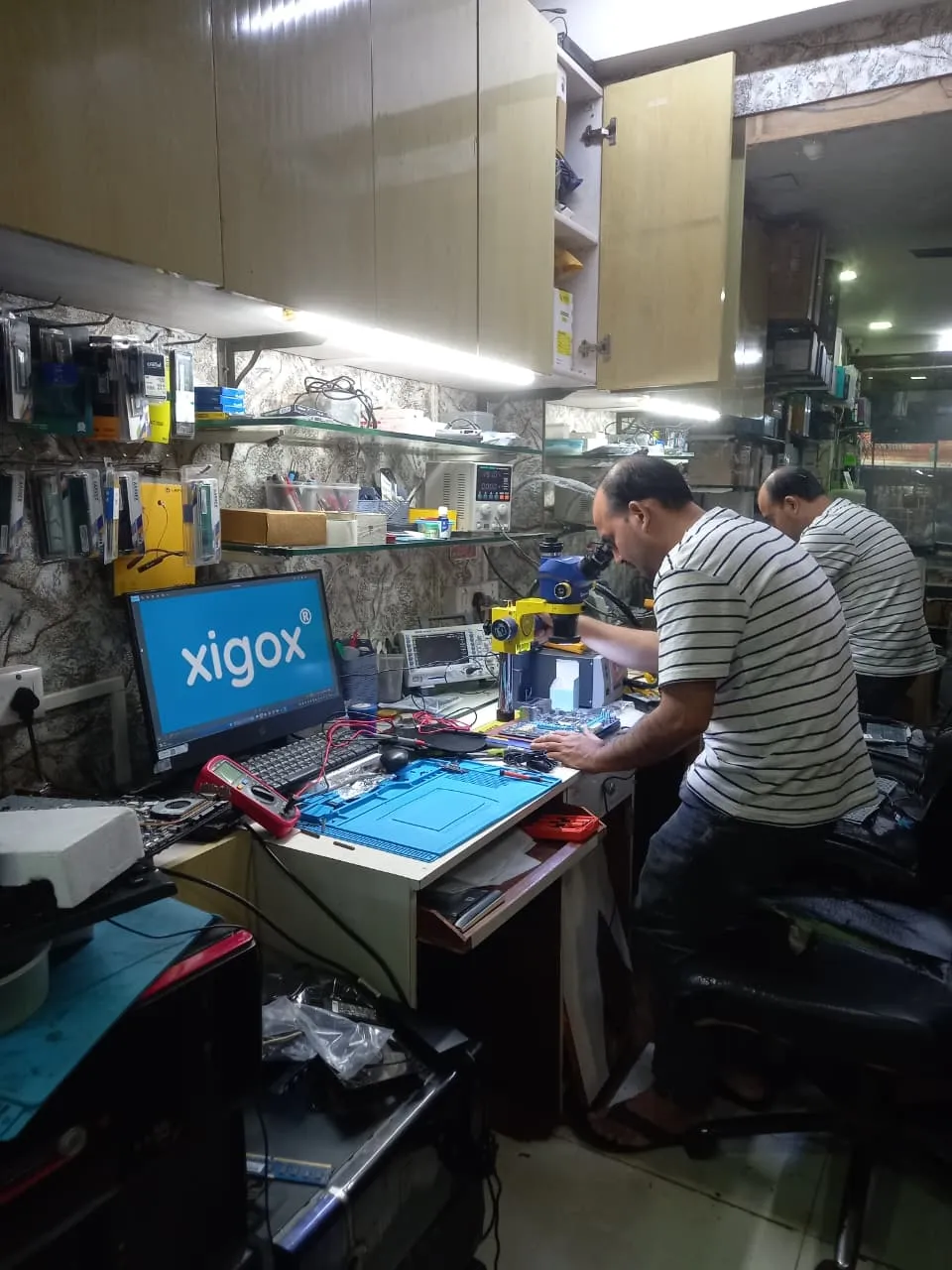






All photos are real photographs of the Xigox team at work.
Why Choose Xigox for Desktop PC Computer Slow Performance in Fort?
Over 9,727+ reviewers across Mumbai trust Xigox for professional, transparent and affordable Desktop PC Computer Slow Performance. Serving all addresses in the 400001 postal zone.
Same-Day Turnaround
Most Desktop PC Computer Slow Performance jobs finished in 2–4 hours. Doorstep service for part replacements; free pickup for lab repairs in Fort.
Transparent Pricing
₹350 inspection fee (refunded if you proceed with repair). Exact written quote before we start. No surprise charges — ever.
Post-Repair WhatsApp Support
WhatsApp support after every Desktop PC Computer Slow Performance job. We answer laptop and computer questions — always free.
Free Pickup & Delivery
Collection and return anywhere in Fort at no charge. Doorstep Desktop PC Computer Slow Performance costs the same as bringing it to us — we do not bill convenience.
No Fix, No Charge
If we cannot resolve your Desktop PC Computer Slow Performance issue you pay nothing beyond the inspection, and the device comes back exactly as we received it.
Open 7 Days, 9 AM–9 PM
Including Sundays and public holidays. Weekend and evening slots in Fort are usually the easiest to book.
Real Technicians. 100% Guaranteed Work.
Most online repair websites outsource your laptop or computer to random local shops. Xigox operates its own fully-equipped repair labs with dedicated IC-level soldering stations and microscopic diagnostic equipment. When you trust us with Computer Slow Performance repair, it stays securely in our controlled environment.
Every technician at Xigox is in-house trained and certified — no freelancers, no third-party sub-contractors. We invest in continuous training so our engineers stay ahead of the latest chipsets, display technologies, and component architectures.
Our lab follows strict data-confidentiality protocols. Your personal files, passwords, and accounts are never accessed during repair — guaranteed.



How We Fix Desktop PC Computer Slow Performance
A transparent, step-by-step process from first contact to warranty-backed delivery
Describe Your Problem
Call or WhatsApp +91 74997 61196. Tell us about the Computer Slow Performance on your Desktop PC in Fort — no technical jargon needed.
Free Doorstep Pickup
We dispatch a certified technician to your Fort address. Pickup is completely free — no travel, no waiting at a service centre.
Expert Diagnosis
Your Desktop PC is inspected by a specialist. We identify the root cause of Computer Slow Performance and provide a transparent written quote — zero obligation.
Approved Repair
Once you approve the quote, we fix Computer Slow Performance using OEM-grade parts. No work starts without your explicit consent.
12-Point Quality Check
Every repaired Desktop PC passes a rigorous 12-point QA checklist. We verify Computer Slow Performance is fully and permanently resolved before handover.
Delivery + 90-Day Warranty
Your Desktop PC is returned to your Fort address with a written 90-day warranty certificate. Same fault recurs? Fixed free.
Live — Recently Repaired Desktops & Computers
Client wanted to upgrade from GTX 1660 to RTX 4070. Existing 450W PSU insufficient for new GPU.
Installed Corsair RM750e PSU with proper cable management. Mounted RTX 4070 with support bracket. Updated BIOS and installed latest drivers....
Old PSU only had one 8-pin PCIe connector. New 750W provides clean, stable power for the RTX 4070.
Mac Mini came with 256GB SSD — constantly full. macOS throwing "disk almost full" warnings daily.
Upgraded internal SSD to 1TB. Migrated all data and macOS using certified tools. Apple Silicon boot verified.
M2 Mac Mini SSD upgrade requires specific NVMe controller compatibility. Used validated module.
PC freezing during multitasking with Chrome, Excel, and Tally running simultaneously. Only 8GB RAM installed.
Upgraded to 32GB DDR4 RAM (2x16GB). Configured dual-channel. All applications running smoothly simultaneously.
Accounting firm with heavy Tally usage. 32GB is optimal for their workflow.
PC infected with ransomware. All personal files encrypted. Desktop showing ransom warning message.
Removed ransomware from offline boot. Recovered 90% of files using shadow copies and specialized tools. Installed enterprise antivirus.
Infection via phishing email attachment. Trained customer on email safety and suspicious link identification.
Customer purchased individual components online. Needed professional assembly, BIOS config, and OS installation.
Assembled all components with cable management. Configured BIOS, enabled XMP for RAM. Installed Windows 11 with all drivers and gaming softw...
Build: Ryzen 7 7800X3D, RTX 4070 Super, 32GB DDR5, 1TB NVMe. Stress tested for stability.
GPU displaying visual artifacts during gaming. Screen flickering and colored pixels during 3D rendering.
Replaced dried thermal paste on GPU die. Repaired micro-solder joint on VRAM chip. Artifacts completely eliminated.
Thermal paste had completely dried out. Applied premium thermal compound rated for 8+ years.
What Computer Slow Performance Means on a Desktop PC
Tower desktops have the most internal space of anything we service, which makes diagnosis straightforward — parts are standard, accessible and individually replaceable.
Why it happens on tower and cabinet desktop owners
- •Failing or underrated power supply on an ageing tower
- •Dust blanketing the CPU cooler and case intake filters
- •Bulging motherboard capacitors after years of mains fluctuation
- •Front-panel power switch or header failure
What our Desktop PC technician checks
- ✓PSU rail testing under load with a bench tester
- ✓Motherboard capacitor and VRM inspection
- ✓Case airflow path and filter condition
- ✓POST diagnostics with known-good RAM and GPU
Desktop PC hardware we work on
- ATX and micro-ATX motherboards
- Modular and non-modular ATX power supplies
- Tower CPU coolers and case fan arrays
- Full-size PCIe graphics cards
- 3.5" HDD bays and 2.5" SSD mounts
Models we see most often
- HP ProDesk and EliteDesk towers
- Dell OptiPlex and Vostro desktops
- Lenovo ThinkCentre towers
- Acer Veriton
Tower parts are standard and widely stocked, so a desktop repair rarely waits on part sourcing — most are finished the same day.
Do I need to bring the monitor, keyboard and mouse?
Just the cabinet is enough for most faults. If the complaint is display-related we may ask for the monitor and its cable so we can reproduce it exactly.
Repair Guides & Troubleshooting Articles for Fort Customers
Written by the Xigox workshop team — diagnostics, cost breakdowns and step-by-step fixes you can read before you book.
Why Is My Computer So Slow to Start Up?
Time the three phases of start-up to find out why your computer is slow: firmware checks, Windows loading or s...
6 min read Computer GuideHow to Recover Deleted Files — Laptop, Computer & Drive Data Recovery Guide
Deleted a file by mistake? Learn why recovery can work, what to do in the first minutes, where to look before...
9 min read Computer TipsHow to Fix Virus & Malware Infection — Windows & Mac Removal Guide
A calm, ordered guide to removing viruses and malware from Windows and Mac: contain it, scan offline, clean st...
9 min read Buying GuideHow to Choose Between Repair and Replacement — Laptop & Computer
A practical way to choose between repairing and replacing a laptop, desktop, all-in-one or MacBook: fault-by-f...
7 min readXigox vs Other Desktop PC Computer Slow Performance Shops in Fort
Honest comparison — decide with confidence in Fort.
| Feature | Xigox | Other Shops |
|---|---|---|
| Certified Technicians | ✅ Trained & Verified | ❌ Unverified |
| Genuine / OEM Parts | ✅ OEM-Quality Parts | ⚠️ May Vary |
| 90-Day Warranty | ✅ Written Certificate | 0–30 Days |
| ₹350 Inspection (refunded if you proceed with repair) | ✅ Always Free | ⚠️ May Charge |
| Same-Day Turnaround | ✅ Fort — Most Repairs | ❌ 1–3 Days |
| Free Doorstep Pickup | ✅ Fort — Free | ❌ Visit Required |
| Transparent Pricing | ✅ Written Quote First | ❌ Surprise Bills |
| Live WhatsApp Updates | ✅ Real-time Repair Status | ❌ No Updates |
* Based on customer feedback & market research. Results may vary. Xigox charges ₹350 for inspection — refunded if you proceed, applied as a credit toward your repair cost.
What Customers Say About
Laptop & Computer Repairs in Fort
What our customers say about their repairs
← Swipe or tap dots to browse →
How We Fix Computer Slow Performance
Watch our diagnostic and repair process step by step


Xigox Service Centre — Mumbai's Trusted Repair Experts
A closer look at the Xigox team, our tools, and the repair process that has earned us 9,727+ five-star reviews across Mumbai MMR.

Inside Xigox — Computer & Laptop Repair Service Centre, Mumbai
Take a tour of our ISO-certified Mumbai service centre — laptop, desktop and computer repairs with genuine-grade parts and a 90-day warranty.

Laptop & Computer Repair, Sales & Data Recovery — Xigox
How the Xigox team handles laptop and computer repair, sales, service and data recovery across Mumbai, Thane & Palghar.
Watch Our Real Repair Reels
@xigox on Instagram — screen repairs, motherboard fixes, before & afters
Display Repair
No signal → back on screen
Power Supply Fix
Dead PC → powered up same day
Motherboard Repair
Chip-level soldering under microscope
Data Recovery
Files rescued from dead hard drive
SSD Upgrade
Boot times cut to seconds
Deep Cleaning
Dust-clogged tower → cool and quiet
Real repair footage — no actors, no scripts
Watch all Reels →FAQs — Desktop PC Computer Slow Performance Repair in Fort
Everything you need to know before booking
Still have questions?
Our team responds within 15 minutes on WhatsApp. Send us your question and get expert advice instantly.
Desktop PC Computer Slow Performance Repair in Fort — Complete Guide
Facing Computer Slow Performance on your Desktop PC in Fort? Xigox provides professional, certified Desktop PC Computer Slow Performance repair in Fort using genuine OEM-grade parts, with fully transparent pricing and a 90-day warranty on all work. Our technicians are trained on all major Desktop PC brands and have completed over 1,00,000 successful repairs since 2011.
Why Is Computer Slow Performance Dangerous to Ignore on a Desktop PC?
Computer Slow Performance on a Desktop PC rarely resolves itself and typically worsens with continued use. At Xigox, we perform a thorough ₹350 inspection (refunded if you proceed with repair) to identify the exact root cause before recommending any repair. You receive a clear written quote — zero obligation to proceed. Most Desktop PC Computer Slow Performance repairs in Fort are completed same-day within 2–4 hours.
Why Choose Xigox for Desktop PC Computer Slow Performance in Fort?
- Certified engineers with hands-on Desktop PC hardware expertise
- Genuine OEM-grade replacement parts — no cheap aftermarket alternatives
- 90-day warranty on every Desktop PC Computer Slow Performance repair
- Free doorstep pickup & delivery anywhere in Fort
- Transparent written quote — no hidden charges, ever
- Same-day turnaround for most common Computer Slow Performance issues
- Post-repair WhatsApp support at no extra cost
Whether your Desktop PC is showing early signs or a severe manifestation of Computer Slow Performance, our Fort team provides fast, reliable solutions. Call, WhatsApp or book online — we respond within 15 minutes.
Desktop PC Computer Slow Performance in Fort — Xigox
At Xigox, the most trusted choice for Desktop PC Computer Slow Performance in Fort. For more than ten years, we have delivered expert and transparent laptop and computer repair services across the entire Mumbai region — with a six-figure repair track record completed to date.
Our Fort-area technicians take care of the complete spectrum of Desktop PC Computer Slow Performance needs — from everyday glitches to board-level faults including screen damage, failing batteries, motherboard issues, water damage, keyboard issues, storage upgrades and data recovery. Every repair is performed by a certified, vetted technician using OEM-grade parts, with a 90-day warranty on all work.
We actively serve the entire 400001 postal area within Mumbai City district, ensuring same-day response for every repair request. ₹350 inspection fee (refunded if you proceed with repair). Located near DN Road, our service coverage extends across Fort and all surrounding localities. In addition to Fort, we also provide doorstep repairs and free pickup for lab work for customers in Kabutar Khana, Mantralaya, Flora Fountain and other nearby areas.
For part replacements (battery, keyboard, screen, SSD, RAM) — our technician visits you directly in Fort. For complex board-level work, we provide free pickup and delivery anywhere in Fort. Reach out via phone, WhatsApp or the booking form — our Fort team usually replies in minutes.
Honest pricing is fundamental to how Xigox operates in Fort. Our ₹350 inspection fee pays for a full diagnostic and is fully refunded if you proceed with the repair. You receive a complete written quote before any work begins. Our Desktop PC Computer Slow Performance pricing is typically 30–40% below brand service centres — with no hidden fees, ever.
Other Desktop PC Problems We Fix in Fort
Xigox resolves all common Desktop PC hardware and software issues in Fort
Computer Slow Performance on Other Device Types in Fort
Xigox fixes Computer Slow Performance on laptops, desktops, all-in-ones, MacBooks and printers
Areas, Roads & Landmarks We Cover in Fort
Free pickup & drop across all these neighbourhoods
📍 Localities & Neighbourhoods
🛣️ Roads & Highways
⭐ Landmarks & Famous Places
Desktop PC Computer Slow Performance Repair Near Fort
Free doorstep service in all these nearby areas
Desktop PC Computer Slow Performance Repair Across All Locations
How We Handle Desktop PC Computer Slow Performance in Fort
Thousands of Fort customers trust this process. No shop visits, no hidden fees, no data risk.
Get In Touch with Our Fort Team
Call, WhatsApp, or fill out our online form. Share your product type (laptop, desktop, all-in-one PC, printer) and the issue you're experiencing. We respond within minutes with repair availability.
Doorstep Service or Free Pickup
For part replacements (battery, keyboard, screen, SSD, RAM), our technician visits your Fort doorstep. For chip-level and body repairs, free pickup and drop from your Fort address. Safe handling and padded transport guaranteed. Customers near DN Road enjoy our fastest pickup times — typically under 30 minutes.
Transparent Diagnosis & Quote
Our certified engineer diagnoses your laptop or computer at our lab. ₹350 inspection fee applies (fully refunded if you proceed with the repair). You receive a clear, itemised written quote before any repair work begins. No surprises, no hidden fees. Our 4.9★ rating across 9,727+ reviews reflects our commitment to thorough quality assurance.
Professional Repair with Genuine Parts
Using OEM-grade components and manufacturer-approved techniques, our technicians repair your laptop or computer to factory-level quality. Most common repairs are completed the same day.
Free Delivery + 90-Day Warranty
Your repaired laptop or computer is delivered back to your Fort doorstep at zero cost. Every repair includes a 90-day written warranty covering parts and labour. Trusted by customers across Mumbai City district — 4.9★ rated.
Rated 4.9★ by 15,244+ customers in Fort. Free pickup, OEM parts, 90-day warranty — book your repair now.
More Repair & Tech Services Near Fort
Same certified technicians · Free pickup · 90-day warranty across all services.
Ready to Fix Your
Desktop PC?
Expert Computer Slow Performance repair · ₹350 inspection (refunded if you proceed with repair) · 90-day warranty
Serving Fort and all of Mumbai MMR · Open 9 AM – 9 PM daily
Desktop PC Computer Slow Performance Repair in Fort — Professional, Reliable, and Affordable
Why waste time on aggregators? Get direct service without middleman markup with Xigox. Desktop PCs have different failure modes from laptop repair: larger PSUs with more failure-prone capacitors, discrete GPU mounting, and tower cooling. Our Fort engineers apply proper desktop diagnostic protocols to identify the exact component at fault — not a full board swap.
The Best Choice for Desktop PC Computer Slow Performance in Fort
There are many repair shops in Fort, however, Xigox stands out for this repair. We believe in 100% upfront pricing. Each this repair begins with a thorough diagnostic inspection for ₹350, which is fully refunded if you proceed. No surprise fees — only expert this repair in Fort.
Fast & Easy Desktop PC Computer Slow Performance in Fort
We know your time is valuable in Fort. Xigox's this job is built for rapid turnaround. For most issues, our Fort technicians finish the this job within hours. We arrange secure collection from your Fort home or office, perform the this job at our certified lab, and deliver it back to you.
Same-Day Desktop PC Computer Slow Performance — How It Works
Wondering how fast Xigox can complete this repair in Fort? Our standard process: First — call or WhatsApp +91 74997 61196 and our pickup technician arrives at your Fort address within 30–60 minutes. Step 2 — our inspection identifies the exact fault. Next — you give the go-ahead via WhatsApp — completely your decision. Finally — this repair is executed using genuine parts in our certified lab, often same day. Then — your desktop PC is delivered back to your Fort address fully tested.
Multi-Brand Expertise in Fort
Your desktop PC model doesn't limit what we can fix. Xigox engineers are brand-agnostic experts: HP, Dell, Lenovo, Asus, Acer, MSI, Intel and custom-built systems. Each brand has quirks in their assembly that our team knows well. Model-specific experience cuts diagnostic time and improves first-time fix rates.
Free Diagnostics in Fort For Desktop PC Computer Slow Performance specifically, Xigox's Fort team follows this exact certified process from start to finish — free pickup, transparent written quote, genuine-grade parts, and a 90-day warranty on the completed Desktop PC Computer Slow Performance.
Uncertain about the issue with your desktop PC? Prior to starting any this repair, Xigox performs a thorough diagnostic check. The ₹350 inspection fee, it is 100% refunded if you proceed with the repair. Our local experts will show you the broken part in plain English so you can make an informed decision.
Component-Level Desktop PC Computer Slow Performance in Fort
Many service centres in Fort can only do part swaps, which is unnecessarily expensive. Xigox's in-house BGA rework station means engineers diagnose the exact failing IC and replace only that component — a fraction of full board replacement. Fort residents seek us out for chip-level this job.
Rigorous Testing after Desktop PC Computer Slow Performance
Fixing the immediate problem is only half the job at Xigox. Before your desktop PC is returned in Fort, it must pass a comprehensive 20-point quality check. Our team ensures that the this repair was 100% successful, checking port functionality. This level of testing is the reason for our 4.9★ rating across Fort.
Free Logistics across Fort For Desktop PC Computer Slow Performance specifically, Xigox's Fort team follows this exact certified process from start to finish — free pickup, transparent written quote, genuine-grade parts, and a 90-day warranty on the completed Desktop PC Computer Slow Performance.
Traveling across town in Fort can be a nightmare. That's why Xigox has built a straightforward pickup and delivery network for this job. Simply share your Fort address, and our technician will pick up the desktop PC from your home or office. After the this job is completed, it is delivered back fully tested and sealed. Save your time without leaving your desk.
Fort Customer Support for Desktop PC Computer Slow Performance
Your this repair doesn't end when the desktop PC is returned. The Xigox after-service team is available daily via call or message. If you notice anything unusual within 90 days of your this repair, just reach out and we dispatch a technician immediately. This promise is why Fort customers choose Xigox again and again.
Your Neighbourhood Experts For Desktop PC Computer Slow Performance specifically, Xigox's Fort team follows this exact certified process from start to finish — free pickup, transparent written quote, genuine-grade parts, and a 90-day warranty on the completed Desktop PC Computer Slow Performance.
Xigox is deeply rooted the Fort community. Since our inception, we have supported dozens of startups with their this job needs. We don't just see you as a customer — you are part of our community. Our community-first approach means we work harder to provide unmatched service. By trusting us for this job in Fort, you get genuine local support.
Technology keeps your life running — keep it running with Mumbai's most trusted Desktop PC Computer Slow Performance experts. Xigox has helped over 10,000 Fort residents with transparent billing. Need a quick fix? WhatsApp us at +91 74997 61196 for priority Desktop PC Computer Slow Performance in Fort.
Desktop PC Computer Slow Performance Repair in Fort — Service Area & Coverage
Xigox provides desktop pc computer slow performance repair across Fort, in the Mumbai City district of Mumbai. Our doorstep pickup and on-site service cover the entire Fort area and the neighbourhoods around it.
Localities we cover in Fort: Ballard Estate, CST, Churchgate. Wherever you are in Fort, a certified Xigox technician can reach you — usually within 30–60 minutes.
Our technicians regularly serve homes, societies and offices around Chhatrapati Shivaji Maharaj Terminus, Bombay Stock Exchange and Horniman Circle Garden, and along MG Road (Fort), DN Road and Horniman Circle Road. If you're near any of these landmarks, same-day pickup for desktop pc computer slow performance repair is almost always available.
Desktop PC Computer Slow Performance Repair near Fort
We also serve these nearby areas — tap your locality for local desktop pc computer slow performance repair:
Desktop PC Computer Slow Performance Repair price in Fort — know it before you book
- 1. Pick your device & issue
- 2. See the real price range
- 3. Free doorstep pickup in Fort
★ 4.9 from 9,727 customer reviews across all repairs · upfront pricing · 90-day warranty
💡 Before you book: have your device model and a quick description of the issue ready — it speeds up your quote.
Find Your Fix by Symptom
Tell us what your device is doing — we'll point you to the right repair, with real pricing and next steps.
~8.7 km from Fort — free doorstep pickup means our technician comes to you, this is just our nearest coordination point.
Desktop PC Computer Slow Performance Repair — Book Now
₹350 inspection fee refunded if you proceed with repair · 90-day warranty
Booking Confirmed!
We'll call you within 1 hour to confirm your appointment and arrange doorstep pickup.
Inspection Fee: ₹350
- Refunded if you proceed — credited toward total repair cost
- Applies if laptop is not repairable or you decline repair
Inspection Fee: ₹350
- If you proceed with the repair, ₹350 is refunded — applied as a credit toward your total repair cost.
- If your laptop is not repairable or you decide not to continue, the ₹350 inspection fee will still apply.
By submitting, you agree to our Privacy Policy.