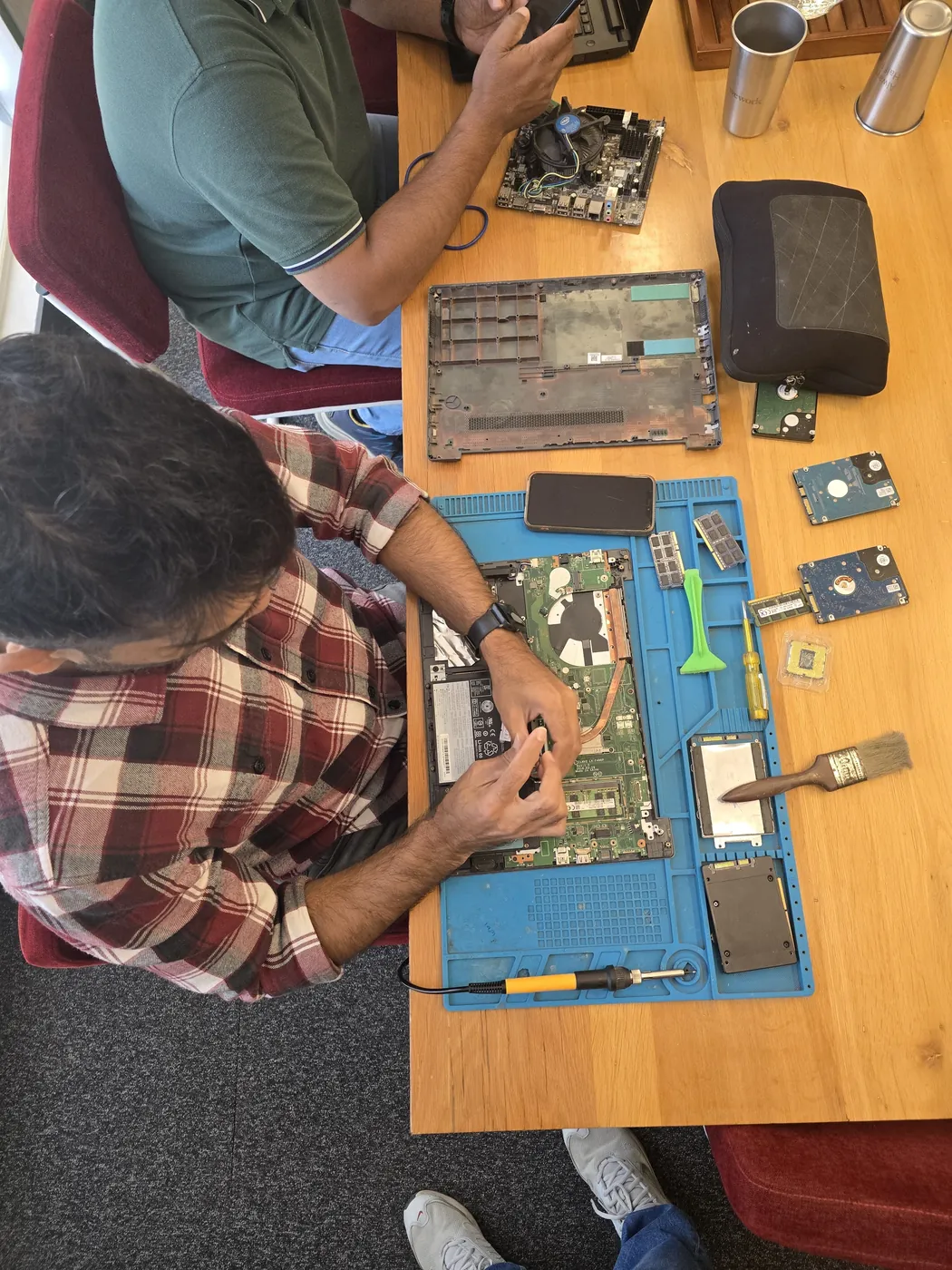
Gaming
PC RTX 4080
- Issue
- No display output, fans spinning. No boot sequence.
- Solution
- Diagnosed motherboard failure. Replaced with compatible board.
Goregaon West
4 Hours
- Motherboard
- Gaming
- Display
 MSI · Computer RAM Upgrade · Lokhandwala
Professional Computer RAM Upgrade for your MSI laptop or computer in Lokhandwala. Experienced technicians, OEM-grade parts & 90-day warranty.
Open 9 AM – 9 PM · 7 days · Free pickup from Lokhandwala & nearby areas
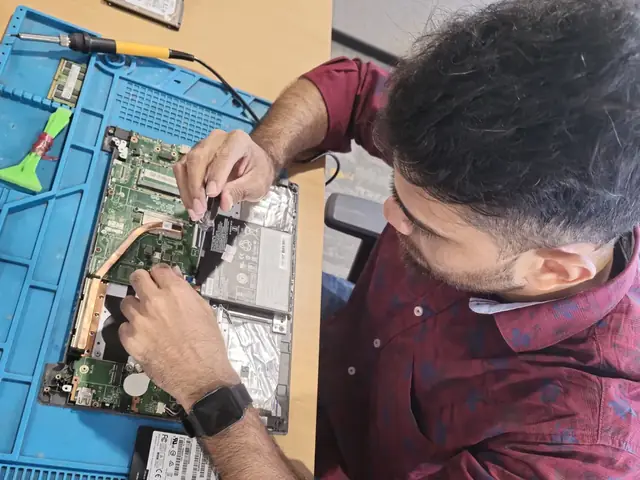
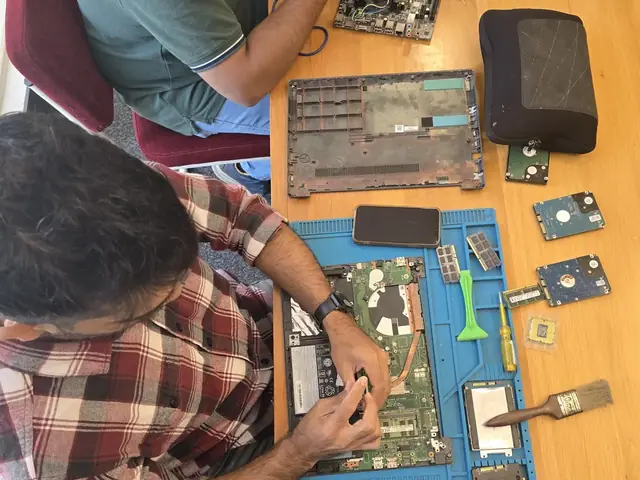
Everything included in your MSI Computer RAM Upgrade service at Xigox Lokhandwala
Verified Speed Boost
Benchmark tests confirm performance improvements after SSD/RAM upgrade on your MSI laptop.
Data Migration Included
All your existing data is safely cloned and transferred to the new SSD — no reinstallation needed.
90-Day Upgrade Warranty
90-day warranty on all hardware upgrades. New component failure covered completely.
OS Compatibility Check
Windows, macOS or Linux compatibility verified post-upgrade. Drivers installed if needed.
Same-Day Service
Most MSI SSD/RAM upgrades completed the same day — typically 1–2 hours.
Performance Report
Before/after performance comparison provided so you can see the real-world improvement.
All Work Backed by 90-Day Warranty
Free re-repair within 90 days if the same issue recurs. No questions asked.
Understand why expert service protects your MSI laptop or computer and extends its lifespan
Upgrading from HDD to NVMe SSD delivers 5–10× faster boot times, app launches and file transfers.
SSDs consume significantly less power than HDDs, giving your MSI Computer longer battery life.
Unlike HDDs, SSDs have no moving parts — they're shock-resistant and far less likely to fail.
An SSD upgrade can give an old MSI Computer 3–5 more years of productive use.
Transparent pricing · No hidden fees · Pay only after service is complete
| Service | Estimated Cost | Warranty |
|---|---|---|
| 4GB RAM Upgrade | ₹2,999 - ₹3,999 | 90 Days |
| 8GB RAM Upgrade | ₹4,999 - ₹7,999 | 90 Days |
| 16GB RAM Upgrade | ₹8,999 - ₹13,999 | 90 Days |
| 32GB RAM Upgrade | ₹16,999 - ₹25,999 | 90 Days |
Final quote provided after free laptop or computer inspection. Work starts only with your approval.
Get Exact QuoteWhy Us?
With 1,00,266+ successful repairs and a 4.9-star rating, Xigox is an independent MSI repair specialist serving Lokhandwala. Conveniently located near Four Bungalows.
Most MSI Computer RAM Upgrade jobs in Lokhandwala are completed same-day. Urgent service available for critical cases.
We quote before starting work. No hidden fees. You pay exactly what you were quoted.
Free WhatsApp support for any questions about your MSI Computer RAM Upgrade after repair — always.
Collection and return anywhere in Lokhandwala at no charge for lab-based MSI work — we don't bill for convenience.
₹350 inspection fee (refunded if you proceed). Written quote before any MSI Computer RAM Upgrade work begins.
If we cannot resolve your MSI Computer RAM Upgrade issue, you pay nothing beyond the inspection fee.
Who repairs your device
Your MSI is handled by Xigox technicians from start to finish. It is never handed on to another shop. Work that needs the repair bench is done at our workshop in Virar West.
Board-level faults are traced with a microscope, a multimeter and a soldering station before any part is replaced, and parts are fitted only after you approve the quote.
We don't open your personal files during a repair. When a job needs access to your data, such as data recovery or a Windows reinstall, we ask you first.




From booking to delivery — transparent, efficient, and professional every step of the way
Call, WhatsApp or book online. Tell us you need Computer RAM Upgrade for your MSI laptop or computer in Lokhandwala. We'll confirm within minutes.
An experienced technician picks up your MSI laptop or computer from your Lokhandwala address at no cost. No travel required.
Your MSI laptop or computer is assessed by a specialist trained on MSI hardware. Full written inspection report — ₹350 fee refunded if you proceed with repair.
We provide a detailed repair quote for Computer RAM Upgrade. Work only starts after your explicit written approval — no hidden charges ever.
Our MSI specialists perform Computer RAM Upgrade using OEM-grade parts and professional-grade tools. multi-point quality check included.
Your MSI laptop or computer is returned to your Lokhandwala address with a written 90-day warranty. If the same issue recurs, we fix it free.
Customer reviews
4.9/5 · 12 reviews shown
← Swipe or tap dots to browse →
Repair examples
Gaming
PC RTX 4080
HP
EliteDesk 800 G9
Technician's note
Accounting firm with heavy Tally usage. 32GB is optimal for their workflow.
Dell
OptiPlex 7010
Technician's note
PSU exceeded 5-year lifespan. Recommended surge protector for office fleet.
Dell
Vostro 3910
Technician's note
Infection via phishing email attachment. Trained customer on email safety and suspicious link identification.
ASUS
ROG Strix GT35
Technician's note
Thermal paste had completely dried out. Applied premium thermal compound rated for 8+ years.
Custom
Build (AMD Ryzen 7)
Technician's note
Old PSU only had one 8-pin PCIe connector. New 750W provides clean, stable power for the RTX 4070.
Watch & learn
Repair videos from our Virar West workshop

A tour of our ISO 9001:2015 certified workshop — laptop, desktop and computer repairs with genuine-grade parts and a 90-day warranty.

How the Xigox team handles laptop and computer repair, sales, service and data recovery across Mumbai, Thane & Palghar.

See how Xigox handles real customer repairs — fast diagnosis, transparent pricing and a 90-day warranty on every job.

A closer look at the Xigox team, our tools, and the repair process behind 9,605+ customer reviews across Mumbai MMR.
FAQ
Everything you need to know before booking your service
10 questions answered
Send us your question on WhatsApp or call — a technician will answer.
If you are looking for MSI Computer repair in Lokhandwala that is not a brand service centre, this is it. Xigox has run an independent MSI bench since 2011, and our technicians work on MSI boards and firmware every day rather than treating them as an occasional job. More than 1,00,000 repairs and a 4.9-star average rating sit behind that.
Every MSI component we fit is OEM-grade and batch-tested before it goes into your Computer — no aftermarket substitutes, no recycled pulls sold as new. You see the part cost and the labour cost separately on the estimate before we start, and the ₹350 inspection comes off the bill if you go ahead.
We actively serve the entire 400053 postal area within Mumbai Suburban district, ensuring same-day response for every repair request. ₹350 inspection fee (refunded if you proceed with repair). Located near Four Bungalows, our service coverage extends across Lokhandwala and all surrounding localities. In addition to Lokhandwala, we also provide doorstep repairs and free pickup for lab work for customers in Oshiwara, Lokhandwala Back Road, Gamdevi and other nearby areas.
How your MSI Computer gets serviced depends on the fault. Part swaps happen on-site anywhere in Lokhandwala; board-level work goes to the bench because it needs proper rework equipment. Either way collection and return are free, and you get progress updates rather than having to chase us.
Your MSI Computer leaves with a written 90-day warranty covering both parts and labour. Same fault back inside that window and we redo it free — no argument, no diagnostic fee. WhatsApp support stays open afterwards for any question about the repair.
Service Hours
Monday – Sunday · 9 AM – 9 PM
Open on all public holidays
Service Area
Lokhandwala & surrounding Mumbai areas
Doorstep repairs + free pickup for lab work
Our Guarantee
90-day warranty on all repairs
Free re-repair if same fault recurs
Product lines
MSI does not build one desktop — it builds 9 separate series, and Computer RAM Upgrade is a different job on each. Xigox services Creator, GF, Katana and MAG and the rest of the MSI range. We regularly take in Creator, GF, Katana and MAG, along with MEG, Modern, Prestige and Raider units for Computer RAM Upgrade in Lokhandwala. Specific MSI models on our current service list include MSI MAG Infinite S3, MSI MEG Trident X2 and MSI PRO DP180. If your MSI model is not listed, it is almost certainly still covered — send us the model number on the base sticker and we will confirm parts availability before you book.
The MSI MEG Trident X2 is part of MSI's MEG line — MSI's flagship high-performance gaming desktops, with the strongest cooling and component tiers in MSI's desktop range.
The MSI PRO DP180 is part of MSI's PRO desktop line — business and productivity-oriented desktops rather than MSI's gaming-focused MAG/MEG lines.
The MSI MAG Infinite S3 is part of MSI's MAG desktop line — mid-tier gaming desktops balancing performance and value, positioned below the flagship MEG line.
Worth knowing for this repair: Standard ATX-compatible internals for straightforward future upgrades.
Guides
Written by the Xigox workshop team — diagnostics, cost breakdowns and step-by-step fixes you can read before you book.
Slow WiFi is rarely fixed by guessing. Run a five-minute wired test, then work through signal, channel, laptop...
7 min read Buying GuideA practical way to choose between repairing and replacing a laptop, desktop, all-in-one or MacBook: fault-by-f...
7 min read Computer GuideUSB port not working on a laptop or desktop? Sort it into one port, every port or one device, then try safe so...
6 min read Computer GuideWindows 11 errors fall into startup, update and driver families. Use the error code to find yours, then follow...
9 min readSelect your MSI model for model-specific service details and pricing
Complete range of MSI repair and upgrade services at Xigox
Not sure if it's a Computer RAM Upgrade issue? Check these common MSI problems
Free pickup & drop across all these neighbourhoods
Free doorstep pickup available in all these areas
Explore more services
Same technicians · Free pickup · 90-day warranty across all services.
Free doorstep pickup · Expert Computer RAM Upgrade · 90-day warranty
Serving Lokhandwala and all of Mumbai MMR · Open 9 AM – 9 PM daily
Comparison
What you get with Xigox in Lokhandwala, side by side.
| Feature | Xigox | Other shops |
|---|---|---|
| Experienced Technicians | Trained & Verified | Varies; ask who will work on the device |
| Genuine / OEM Parts | OEM-Quality Parts | Varies; ask which part will be fitted |
| 90-Day Warranty | Written Certificate | Varies; ask for the warranty in writing |
| Diagnosis / Inspection | ₹350, credited to the repair | Varies; ask what the diagnosis costs |
| Same-Day Turnaround | Lokhandwala — Most Repairs | Varies; ask for a time in writing |
| Free Doorstep Pickup | Lokhandwala — Free | Varies; ask whether pickup is free |
| Transparent Pricing | Written Quote First | Varies; ask for a written quote first |
| Live WhatsApp Updates | Real-time Repair Status | Varies; ask how you will get updates |
Xigox charges ₹350 for inspection — credited to your repair cost if you go ahead.
How it's done
What our technicians do, what it requires, and how to tell you need it.
For an upgrade rather than a repair, we run a memory diagnostic pass (testing each stick individually when more than one is installed) to confirm whether the fault is a bad module, a loose seating, or a slot-level issue, then fit correctly-specced modules and re-run the test to confirm stability.
Typical time: 15–30 minutes
Why waste time on aggregators? Get direct service without middleman markup with Xigox. MSI Computer RAM Upgrade at the hardware level changes the performance ceiling for: multiple browser tabs, video editing, code compilation, and virtual machines. Our engineers verify maximum supported RAM — avoiding the common DIY mistake of buying incompatible modules. All upgrade work in Lokhandwala includes a post-installation stress test to confirm the performance gain.
Xigox's responsibility extends beyond the repair itself. The Xigox after-service team remains reachable 7 days a week, 9 AM–9 PM via WhatsApp or phone. Should any concern arise within 90 days of your issue, simply contact us and a technician is dispatched at no cost. This commitment is why residents in Lokhandwala return to Xigox.
Your private information is fully protected during your repair. Residents across Lokhandwala rely on Xigox because we follow strict data privacy protocols. During the repair, your photos, emails, and passwords are completely secure. In cases where OS reinstallation is required, we will always inform you first.
Longevity matters for this issue. Because of this, our team strictly use OEM-grade parts for your MSI. Instead of grey-market components, we use trusted supply chains. This is how we help your issue stay durable, supported by our standard 90-day warranty.
Navigating traffic in Lokhandwala can be a nightmare. To solve this, Xigox offers a no-hassle doorstep logistics service for the repair. Simply share your Lokhandwala address, and our secure courier will collect your MSI directly from you. Once the repair is finished, we safely return it in protective packaging. Enjoy total convenience without leaving your desk.
When should you consider it's time for this issue on your MSI? Watch for: frequent freezing, excessive heat, lagging response, strange noises, battery draining fast, or dead pixels. Experiencing even one of these in Lokhandwala, don't ignore them — delaying often increases repair costs. Xigox technicians can diagnose your MSI within the hour and advise on the right this issue.
There are many repair shops in Lokhandwala, however, Xigox stands out for the repair. We believe in 100% upfront pricing. Each repair begins with a thorough diagnostic inspection for ₹350, which is fully refunded if you proceed. No surprise fees — only expert repair in Lokhandwala.
Getting your MSI fixed in Lokhandwala is designed to be straightforward. First, message us at +91 74997 61196 sharing your issue. Then, our free pickup technician arrives at your Lokhandwala address within the same day. Our engineers then perform a detailed diagnostic (₹350, refunded if you proceed). After your approval, this issue is completed with OEM-grade parts — and your MSI is delivered back to you. Total turnaround: 24-48 hours.
Wondering how fast Xigox can complete repair in Lokhandwala? Our standard process: First — call or WhatsApp +91 74997 61196 and our pickup technician reaches you within 2 hours. Then — ₹350 diagnostic pinpoints the issue. Step 3 — you approve the quote via WhatsApp — zero pressure. Step 4 — the repair is done using OEM-grade components by our engineers, usually within 2–4 hours. Step 5 — your MSI is delivered back to your Lokhandwala address with a quality report.
We repair devices for homes, offices and colleges across Lokhandwala book us with free pickup and drop. You get a written quote before any work, OEM-grade parts and a 90-day warranty, for a single MSI or a whole office. When you choose Xigox for this issue in Lokhandwala, you get the same service and warranty as every other customer.
Following a professional repair in Lokhandwala, you can expect significantly better performance: faster boot times, lower fan noise, full-day battery performance, or crisp, bright display — based on what was fixed. Xigox performs a benchmark at the end of every repair in Lokhandwala to document the improvement.
Countless happy customers across Mumbai, Thane and Palghar confirm our expertise. We're the reliable choice for MSI Computer RAM Upgrade in Lokhandwala. Every repair comes with a written warranty, genuine parts, and full honesty. Request your quote — WhatsApp us today.
Service area
Xigox provides msi computer ram upgrade across Lokhandwala (PIN 400053), in the Mumbai Suburban district of Mumbai. Our doorstep pickup and on-site service cover the entire Lokhandwala area and the neighbourhoods around it.
Localities we cover in Lokhandwala: Andheri West, Oshiwara, Four Bungalows, Lokhandwala Circle. Wherever you are in Lokhandwala, we can collect your device from your door and bring it back after the repair.
Our technicians regularly serve homes, societies and offices around Lokhandwala Complex, Poisar River and Filmistan Studio, and along New Link Road and Back Road. If you're near any of these landmarks, same-day pickup for msi computer ram upgrade is almost always available.
We also serve these nearby areas — tap your locality for local msi computer ram upgrade:
4.9 from 9,605 customer reviews across all repairs · upfront pricing · 90-day warranty
Before you book: have your device model and a quick description of the issue ready — it speeds up your quote.
Not sure what's wrong?
Tell us what your device is doing — we'll point you to the right repair, with real pricing and next steps.
Nearest branch: Andheri West
~2.2 km from Lokhandwala. With free doorstep pickup you don't need to travel — this is our nearest branch.
Book a repair
Free pickup · Genuine parts · 90-day warranty
We'll call you within 1 hour to confirm your appointment and arrange doorstep pickup.
Inspection fee: ₹350
Device type *
Inspection fee: ₹350
Your details are used only to arrange this repair. By submitting, you agree to our Privacy Policy.
 Acer
 Apple
 ASUS
 Dell
 HP
 Intel
 Lenovo
 Samsung