Same-Day Service Available in Juchandra

Computer BIOS Update in Juchandra

Expert PC BIOS Update in Juchandra. We handle OS installation, BIOS repair, driver updates, and system recovery for Windows, macOS, and Linux. Clean install with drivers and software configuration included.

Computer BIOS Update in Juchandra, in short: diagnosis is ₹350, credited to the repair; repairs start at ₹699 (price list). Most repairs are finished the same day; board-level work takes 2–5 days. Free pickup within 2 hours in Juchandra and across Mumbai, Thane and Palghar. Simple replacements at your door; board-level and body repairs at our Virar West workshop after free pickup. Every repair carries a 90-day written warranty.

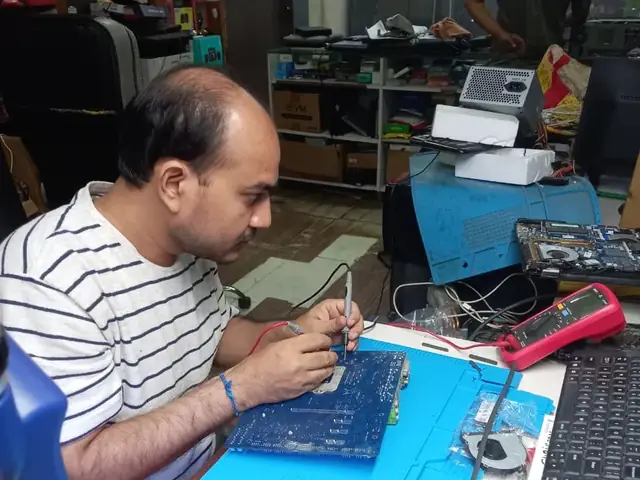
Technician probing a computer motherboard with a multimeter and soldering iron Technician testing a laptop mainboard with a multimeter beside a Xigox-branded monitor
Xigox technicians at the repair bench

Quick facts

Typical price

₹2,999–₹14,000+

Turnaround

2–5 hours

Warranty

90-day warranty

Professional Computer BIOS Update in Juchandra

Why waste time on aggregators? Get direct service without middleman markup with Xigox. Desktop PCs have different failure modes from laptop repair: larger PSUs with more failure-prone capacitors, discrete GPU mounting, and tower cooling. Our engineers apply proper desktop diagnostic protocols to identify the exact component at fault — not a full board swap.

The Best Choice for Computer BIOS Update in Juchandra

There are many repair shops in Juchandra, however, Xigox stands out for this repair. We believe in 100% upfront pricing. Each repair begins with a thorough diagnostic inspection for ₹350, which is fully refunded if you proceed. No surprise fees — only expert repair in Juchandra.

Component-Level Computer BIOS Update in Juchandra

Swapping the whole board costs 3–5x more than fixing the fault on it. Xigox's on-site BGA rework station means engineers identify the specific chip and repair at the component level — saving customers thousands of rupees. Customers in Juchandra come to Xigox specifically for this.

Safe & Secure Computer BIOS Update

Your private information is fully protected during your repair. Residents across Juchandra rely on Xigox because we follow strict data privacy protocols. During the repair, your photos, emails, and passwords are completely secure. In cases where OS reinstallation is required, we will always inform you first.

What Juchandra Customers Say About Computer BIOS Update

Numbers speak louder. Xigox maintains a 4.9-star rating from 9,727+ customer reviews from customers across Mumbai MMR. Common praise includes: accurate quotes, fast turnaround, and genuine parts. What Juchandra customers value most: "Fast, professional service with fair pricing." Become part of the growing community of satisfied Xigox customers in Juchandra.

No Hidden Costs Policy for Computer BIOS Update

The biggest frustration about repair shops in Juchandra is surprise bills after the job is done. We've built our entire model around transparency. Prior to touching your desktop PC, our technician shares a written quote that covers everything. You see the exact cost — approve it or decline, no pressure. Our ₹350 inspection fee is fully refunded when you approve the repair.

No-Obligation Testing in Juchandra

Not sure what's wrong with your desktop PC? Before you commit to any job, Xigox conducts a comprehensive hardware inspection. While we charge a nominal ₹350, this amount is fully refunded when you approve the quote. Our local experts will explain the exact fault clearly so you can make an informed decision.

Our Computer BIOS Update Process in Juchandra

Arranging this repair in Juchandra is incredibly hassle-free. Step 1, call or WhatsApp us at +91 74997 61196 to describe your issue. Next, our complimentary collection driver arrives at your Juchandra doorstep within 1–2 hours. The team then carry out a thorough diagnostic (₹350, credited toward your repair). Once you agree, this repair is executed with genuine parts — and your desktop PC is returned to you. Most repairs done same day.

Any desktop PC, Any Brand in Juchandra

Your desktop PC model doesn't limit what we can fix. Our technicians are brand-agnostic experts: HP, Dell, Lenovo, Asus, Acer, MSI, Intel and custom-built systems. Each brand has quirks in their assembly that our team knows well. Model-specific experience cuts diagnostic time and improves first-time fix rates.

Post-Repair Performance Computer BIOS Update

Following a professional repair in Juchandra, you can expect significantly better performance: faster boot times, lower fan noise, full-day battery performance, or crisp, bright display — based on what was fixed. Xigox performs a benchmark at the end of every repair in Juchandra to document the improvement.

Same-Day Rush Computer BIOS Update in Juchandra

Is your deadline today? We provide emergency this job in Juchandra for time-sensitive situations. Whether you have a presentation tomorrow and your desktop PC just stopped working, our priority service guarantees your desktop PC is repaired within 4–6 hours. Priority repairs are available 7 days a week in Juchandra. Simply mention 'URGENT' when booking and we'll prioritise your job immediately.

Technology keeps your life running — keep it running with a trusted Computer BIOS Update service. Xigox serves homes and offices across the region with zero hidden charges. Ready to get started? Call us at +91 74997 61196 for same-day Computer BIOS Update in Juchandra.

· Verified by Xigox experienced technicians

Computer BIOS Update — Pricing

Transparent pricing. ₹350 inspection fee (refunded if you proceed with repair). Exact quote before work starts. No hidden charges.

Issue / ComponentRepair PriceWarranty
OS Installation ₹699 - ₹1,199 90 Days
OS + Drivers + Software ₹1,199 - ₹2,099 90 Days
BIOS Repair + OS Install ₹1,699 - ₹3,199 90 Days
Complete System Recovery ₹2,299 - ₹4,399 90 Days

* Inspection fee ₹350 (refunded if you proceed with repair). Final price confirmed after diagnosis. No hidden charges.

Our process

Computer BIOS Update Process for Juchandra Customers — Rated 4.9★

Serving Juchandra and Chinchoti, Naigaon East, Bhabola with a repair process designed for zero hassle and maximum transparency.

  1. Step 1Step 1: Get In Touch with Our Team Free

    Get In Touch with Our Team

    Call, WhatsApp, or fill out our online form. Share your product type (laptop, desktop, all-in-one PC, printer) and the issue you're experiencing. We respond within minutes with repair availability.

  2. Step 2Step 2: Doorstep Service or Free Pickup

    Doorstep Service or Free Pickup

    For part replacements (battery, keyboard, screen, SSD, RAM), our technician visits your Juchandra doorstep. For chip-level and body repairs, free pickup and drop from your Juchandra address. Safe handling and padded transport guaranteed. Pickup also available for Chinchoti, Naigaon East and all nearby areas.

  3. Step 3Step 3: Transparent Diagnosis & Quote

    Transparent Diagnosis & Quote

    Our experienced engineer diagnoses your laptop or computer at our lab. ₹350 inspection fee applies (fully refunded if you proceed with the repair). You receive a clear, itemised written quote before any repair work begins. No surprises, no hidden fees. Our 4.9★ rating across 9,727+ reviews reflects our commitment to thorough quality assurance.

  4. Step 4Step 4: Professional Repair with Genuine Parts

    Professional Repair with Genuine Parts

    Using OEM-grade components and manufacturer-approved techniques, our technicians repair your laptop or computer to factory-level quality. Most common repairs are completed the same day.

  5. Step 5Step 5: Free Delivery + 90-Day Warranty

    Free Delivery + 90-Day Warranty

    Your repaired laptop or computer is delivered back to your Juchandra doorstep at zero cost. Every repair includes a 90-day written warranty covering parts and labour. Trusted by customers across Palghar district — 4.9★ rated.

Ready to start? Call or WhatsApp now for a ₹350 inspection (refunded if you proceed with repair) and same-day service from Juchandra.

How it's done

How We Perform Computer BIOS Update

What our technicians do, what it requires, and how to tell you need it.

1 How It's Performed

For a repair job on this component, for an installation or reinstall, we back up your existing files first, install a genuine, correctly licensed copy of the operating system, and install the specific driver set your exact hardware model needs — not a generic driver pack that happens to install without errors.

Typical time: 30–90 minutes

2 What This Requires

  • A backup of your existing files before any OS-level work begins — a format/reinstall is not reversible afterward.
  • Genuine, licensed software — we don't install pirated copies, which carry both legal risk and a much higher rate of hidden malware.
  • The manufacturer-specific driver package for your exact model, not a generic one.

3 When You Need This

  • Repeated driver crashes or "device not working properly" errors in Device Manager that persist across restarts.

Who repairs your device

Repaired in-house by Xigox technicians

Computer BIOS Update is handled by Xigox technicians from start to finish, never handed on to another shop. Work that needs the repair bench is done at our workshop in Virar West.

Board-level faults are traced with a microscope, a multimeter and a soldering station before any part is replaced, and parts are fitted only after you approve the quote.

We don't open your personal files during a repair. When a job needs access to your data, such as data recovery or a Windows reinstall, we ask you first.

  • Repaired in-house, not outsourced
  • Quote approved by you before work starts
  • Your files stay private
  • Microscope and board-level tools
  • Genuine or OEM-grade parts
  • 90-day warranty on repairs
Technician inspecting a laptop motherboard under a microscope at the repair bench Technician testing a laptop mainboard with a multimeter beside a Xigox-branded monitor Technician brushing dust off an opened laptop motherboard with a cleaning brush Technician inspecting a laptop motherboard under a microscope at the repair bench
Xigox technicians at the repair bench.

Why Xigox?

Why Choose Xigox for Computer BIOS Update?

Over 9,727+ reviewers across Mumbai trust Xigox for professional, transparent and affordable Computer BIOS Update. Conveniently located near Naigaon-Bhiwandi Road.

Your Data Stays Private

Technicians do not browse personal files during Computer BIOS Update. If a procedure could touch stored data we tell you before, not after.

Component-Level Capability

We repair at chip and board level where it is safe to do so, which is why Computer BIOS Update here often costs a fraction of a full-module swap.

Experienced Repair Engineers

Every Computer BIOS Update technician is trained in-house, and every job is tested before it goes back to you.

Genuine OEM Components

Only genuine or OEM-grade parts used for Computer BIOS Update — zero aftermarket shortcuts, ever.

90-Day Repair Warranty

Your Computer BIOS Update is covered by a written 90-day warranty. Same fault recurs? We fix it free.

Same-Day Turnaround

Most Computer BIOS Update jobs finished in 2–4 hours. Doorstep service for part replacements; free pickup for lab repairs in Juchandra.

Repairs Completed
1,00,096+
Since 2011
Average Rating
4.9 ★
9,727+ reviews
Repair Warranty
90 Days
Parts & labour
Avg Response
30 Min
For common issues
Pickup & Drop
Free
₹350 inspection fee
Est. Since
2011
15+ yrs in Palghar

Xigox vs Other Computer BIOS Update Options in Juchandra

What Xigox puts in writing, and what to ask any other shop or listing

FeatureXigoxOther shops & listings
Experienced Technicians YesVaries; ask who will work on the device
Transparent Pricing (₹350 Inspection) YesVaries; ask for a written quote first
90-Day Warranty YesVaries; ask for the warranty in writing
Free Pickup & Drop YesVaries; ask whether pickup is free
Genuine Parts OEM PartsVaries; ask which part will be fitted
Same-Day Service Most RepairsVaries; ask for a time in writing
ISO 9001 Certified YesVaries; ask for their certificate

Repair examples

Recently Repaired Laptops & Computers

View All Recent Repairs

Custom

Gaming PC

Fixed
Issue
Customer purchased individual components online. Needed professional assembly, BIOS config, and OS installation.
Solution
Assembled all components with cable management. Configured BIOS, enabled XMP for RAM. Installed Windows 11 with all drivers and gaming softw...

Technician's note

Build: Ryzen 7 7800X3D, RTX 4070 Super, 32GB DDR5, 1TB NVMe. Stress tested for stability.

Goregaon West 4 Hours
  • Custom Build
  • Gaming
  • Assembly

HP

ProDesk 400 G7

Fixed
Issue
Desktop not powering on. Power button LED blinking 5 times — indicates motherboard failure per HP diagnostics.
Solution
Found 3 bulging capacitors near CPU VRM section. Replaced all faulty capacitors with same-spec rated components. Tested under load for stabi...

Technician's note

Capacitor failure likely caused by prolonged voltage fluctuation. Recommended UPS installation.

Malad West 3 Hours
  • HP
  • Motherboard
  • Capacitor

Custom

Build (AMD Ryzen 7)

Fixed
Issue
Client wanted to upgrade from GTX 1660 to RTX 4070. Existing 450W PSU insufficient for new GPU.
Solution
Installed Corsair RM750e PSU with proper cable management. Mounted RTX 4070 with support bracket. Updated BIOS and installed latest drivers....

Technician's note

Old PSU only had one 8-pin PCIe connector. New 750W provides clean, stable power for the RTX 4070.

Andheri East 2.5 Hours
  • Gaming PC
  • GPU Upgrade
  • PSU

Mac

Mini M2

Fixed
Issue
Mac Mini came with 256GB SSD — constantly full. macOS throwing "disk almost full" warnings daily.
Solution
Upgraded internal SSD to 1TB. Migrated all data and macOS with Apple's migration tools. Apple Silicon boot verified.

Technician's note

M2 Mac Mini SSD upgrade requires specific NVMe controller compatibility. Used validated module.

Borivali West 2 Hours
  • SSD
  • Mac Mini
  • Apple

HP

EliteDesk 800 G9

Fixed
Issue
PC freezing during multitasking with Chrome, Excel, and Tally running simultaneously. Only 8GB RAM installed.
Solution
Upgraded to 32GB DDR4 RAM (2x16GB). Configured dual-channel. All applications running smoothly simultaneously.

Technician's note

Accounting firm with heavy Tally usage. 32GB is optimal for their workflow.

Dadar West 30 Minutes
  • RAM
  • HP
  • Upgrade

Dell

Vostro 3910

Fixed
Issue
PC infected with ransomware. All personal files encrypted. Desktop showing ransom warning message.
Solution
Removed ransomware from offline boot. Recovered 90% of files using shadow copies and specialized tools. Installed enterprise antivirus.

Technician's note

Infection via phishing email attachment. Trained customer on email safety and suspicious link identification.

Malad West 5 Hours
  • Virus
  • Ransomware
  • Dell

Customer reviews

What Customers Say About Computer BIOS Update in Juchandra

4.9/5 · 18 reviews shown

See all 9,727+ reviews

Acer Predator Orion 5000 — Memory Upgrade

“My Acer Predator Orion 5000 struggled with just eight gigs of RAM. Xigox Malad installed thirty-two gigs in dual-channel with XMP enabled. Run Photoshop, Chrome, and Slack simultaneously now without any slowdown. Huge improvement.”
A Arjun Thakur Vartak Nagar · 2 Aug 2025 23

Acer Aspire TC-1780 — SSD Speed Upgrade

“Upgraded my aging Acer Aspire TC-1780 from HDD to NVMe SSD at Xigox Powai. Boot time dropped from three minutes to eight seconds. Photoshop launches in three seconds. Feels like a brand-new machine. Best upgrade investment.”
P Pranav Deshpande Titwala · 26 Mar 2024 42

MSI MEG Trident X2 — Memory Upgrade

“My MSI MEG Trident X2 struggled with just eight gigs of RAM. Xigox Churchgate installed thirty-two gigs in dual-channel with XMP enabled. Run Photoshop, Chrome, and Slack simultaneously now without any slowdown. Huge improvement.”
H Hemant Gadkari Nepean Sea Road · 23 Jan 2025 24

Custom Office PC — PC Not Turning On Fix

“My Custom Office PC went completely dead after a power surge. Xigox Thane replaced the blown PSU and repaired the front panel wiring. Also installed a surge protector. System boots perfectly with all data intact.”
S Suresh Iyer Juchandra · 9 Dec 2025 35

Custom Office PC — Boot Issues Fix

“My Custom Office PC stopped booting into Windows showing disk errors. Xigox Vasai diagnosed a failing SSD, cloned all data to a new drive, and restored full boot functionality. All programs and settings preserved perfectly.”
K Kunal Shah Byculla · 30 Aug 2025 3

Intel NUC 11 Essential — Power Supply Fix

“My Intel NUC 11 Essential shut down during gaming sessions. Xigox Lower Parel diagnosed PSU voltage drops under load. Replaced with eighty-plus gold rated unit and routed cables neatly. Zero shutdowns since then. Professional work.”
R Revati Aphale Lower Parel · 28 Dec 2024 5
Page 1 / 3

← Swipe or tap dots to browse →

Customer stories

Customer Stories

What customers say about their laptop and computer repairs

“Desktop was freezing randomly. Xigox diagnosed a failing HDD, replaced with SSD. Boot time went from 3 minutes to 15 seconds. Outstanding upgrade!”

HP ProDesk 600 G6

S Sudhir Pawar Navi Mumbai
“Graphics card died on our office desktop. Xigox sourced a compatible GPU and installed it same day. CAD software running smoothly again. Great service!”

Dell OptiPlex 7080

K Kavya Shetty Vashi
“RAM upgrade from 8GB to 32GB plus NVMe SSD. Xigox handled everything — cable management, BIOS update, Windows reinstall. PC is blazing fast now!”

Custom Gaming PC

P Pramod Jadhav Kharghar
“iMac screen had a crack — thought it was a write-off. Xigox repaired it for half the Apple Store price. Looks and works perfectly. Saved so much money!”

Apple iMac 2021

S Sunita Rathod Belapur
“PSU blew out with a bang. Xigox replaced the power supply unit within 3 hours. All data intact, no OS reinstall needed. Professional and fast!”

Lenovo ThinkCentre M90n

V Vilas Shinde Nerul
“Blue screen errors every hour. Xigox ran diagnostics — faulty RAM stick. Replaced under warranty, reinstalled Windows 11. No crashes in 2 months!”

Assembled Desktop i7

R Rashmi Deshpande Panvel

FAQ

Frequently Asked Questions — Computer BIOS Update

Everything you need to know about Computer BIOS Update in Juchandra

10 questions answered

OS installation takes 1-2 hours. With all drivers and software, expect 2-4 hours total.
Yes — out-of-warranty computers are most of what we handle in Juchandra. Once the manufacturer warranty lapses, authorised centres often quote near-replacement prices for a single component. We repair at component level where it is safe to do so, which is usually a fraction of that cost, and back it with our own 90-day warranty. Trusted by customers throughout Palghar — rated 4.9★ across 9,727+ reviews.
You pay nothing beyond the ₹350 inspection. If we cannot resolve the fault, we explain exactly what we found, return your computer in the condition we received it, and — where the economics do not justify a repair — tell you so plainly rather than selling you work that is not worth doing. Customers across Juchandra (401208) enjoy priority same-day scheduling.
For software faults, setup, upgrades and diagnostics we can work on-site anywhere in Juchandra. Component-level work — board repair, screen bonding, liquid-damage recovery — needs workshop equipment, so we collect the computer, repair it, and return it. Both options are free of travel charges. We've been serving Palghar district for over 15 years.
We send live updates over WhatsApp at each stage: collection, diagnosis, quote approval, repair completion, and dispatch. You can reply to that thread at any point to reach the technician handling your computer rather than a general helpline. Our service covers the full 401208 postal area in Juchandra.
Back up documents, photos and anything stored only on that computer before any repair — with us or anyone else. Most Computer BIOS Update work does not touch your data, but board-level faults and storage failures can be unpredictable. Tell us in advance if the drive holds irreplaceable data and we will treat recovery as the first priority. Customers near Naigaon-Bhiwandi Road in Juchandra are covered by our free pickup.
Our rule of thumb: if the repair costs more than roughly half of a comparable replacement and the computer is more than five years old, replacement is usually the better call. We tell you which side of that line you are on during the inspection in Juchandra, even when the answer means we do not get the job. We've been serving Palghar district for over 15 years.
Yes — Xigox operates 9 AM to 9 PM, seven days a week in Juchandra, including Sundays and public holidays. Weekend pickups are often the most convenient option for people who cannot be at home on a working day. Our service covers the full 401208 postal area in Juchandra.
Yes, on request. Any component we remove during Computer BIOS Update is yours, and we will hand it back with the repaired computer so you can see exactly what was changed. Just mention it when you approve the quote. Customers across Juchandra (401208) enjoy priority same-day scheduling.
The cost of Computer BIOS Update in Juchandra depends on your laptop or computer model and the extent of damage. Xigox charges ₹350 for inspection — refunded if you proceed with the repair — you'll receive a transparent, written quote with no hidden charges. Most standard Computer BIOS Update jobs start from ₹499. Call or WhatsApp +91 74997 61196 for an instant estimate. Our service covers the full 401208 postal area in Juchandra.

Still have questions?

Send us your question on WhatsApp or call — a technician will answer.

Explore more services

More Repair & Tech Services Near Juchandra

Same technicians · Free pickup · 90-day warranty across all services.

Book a repair

Book Computer BIOS Update — Free Pickup

Get your laptop or computer fixed today. Fill in 4 fields and we'll call within 1 hour.

Booking received

We'll call you within 1 hour to confirm your appointment and arrange doorstep pickup.

Inspection fee: ₹350

  • Credited to your total repair cost if you go ahead.
  • Still applies if the device can't be repaired or you decline the repair.

+91

Device type *

Inspection fee: ₹350

  • If you go ahead with the repair, the ₹350 is credited to your total repair cost.
  • If the device can't be repaired or you decide not to continue, the ₹350 inspection fee still applies.

Your details are used only to arrange this repair. By submitting, you agree to our Privacy Policy.

Get Your Laptop or Computer Fixed Today

Computer BIOS Update in Juchandra. Free pickup • 90-day warranty • Genuine parts

Open All Days · 9 AM – 9 PM · Reply within 15 minutes

PC specifics

What Computer BIOS Update Means on a PC

Custom and gaming builds fail differently from office machines — the causes are usually thermal headroom, power delivery under load, or an aggressive overclock rather than worn-out parts.

Why it happens on custom-build, gaming and workstation PC owners

  • Pump failure or air pockets in an AIO liquid cooler
  • PSU sagging under peak GPU transient load
  • Unstable XMP / EXPO memory profile causing crashes under load
  • GPU thermal pads dried out on the VRAM side

What our PC technician checks

  • Sustained load testing with per-core and GPU thermal logging
  • AIO pump RPM and coolant flow verification
  • PSU transient response under peak draw
  • Memory stability testing at rated and stock profiles

PC hardware we work on

  • High-TDP CPUs with AIO or tower air coolers
  • Multi-fan and custom liquid-cooling loops
  • High-wattage 80 Plus power supplies
  • Overclocked RAM running XMP / EXPO profiles
  • Dedicated gaming GPUs with triple-fan shrouds

Models we see most often

  • Custom Ryzen and Intel gaming builds
  • MSI, Asus ROG and Gigabyte boards
  • NVIDIA RTX and AMD Radeon cards
  • Workstation and content-creation rigs

We test gaming and workstation builds under sustained real load, not just at idle — a fault that only appears after twenty minutes of gaming will not show up in a five-minute bench check.

Will you keep my overclock settings?

We record your BIOS profile before any work and restore it afterwards. If the overclock is the actual cause of instability we will show you the test logs and recommend a stable profile.

Service area

Computer BIOS Update in Juchandra — Service Area & Coverage

Xigox provides computer bios update across Juchandra (PIN 401208), in the Palghar district of Naigaon. Our doorstep pickup and on-site service cover the entire Juchandra area and the neighbourhoods around it.

Localities we cover in Juchandra: Naigaon East, Virar. Wherever you are in Juchandra, we can collect your device from your door and bring it back after the repair.

Our technicians regularly serve homes, societies and offices around Juchandra Village, Naigaon Station and Chinchoti Waterfall (nearby), and along Juchandra Road, Naigaon-Bhiwandi Road and SH-43. If you're near any of these landmarks, same-day pickup for computer bios update is almost always available.

Computer BIOS Update near Juchandra

We also serve these nearby areas — tap your locality for local computer bios update:

Computer BIOS Update price in Juchandra — know it before you book

  1. 1Pick your device & issue
  2. 2See the real price range
  3. 3Free doorstep pickup in Juchandra

4.9 from 9,727 customer reviews across all repairs · upfront pricing · 90-day warranty

Before you book: have your device model and a quick description of the issue ready — it speeds up your quote.

Not sure what's wrong?

Find Your Fix by Symptom

Tell us what your device is doing — we'll point you to the right repair, with real pricing and next steps.

See all repair problems we fix

Nearest branch: Bhayandar West

~4.8 km from Juchandra. With free doorstep pickup you don't need to travel — this is our nearest branch.

Call WhatsApp







