Same-Day Service Available in Juchandra

Laptop & Computer Router Configuration in Juchandra

Professional Router Configuration in Juchandra with 90-day warranty. Our experienced technicians provide expert diagnosis and repair using quality parts. Same-day service available for most issues across all brands.

Laptop & Computer Router Configuration in Juchandra, in short: diagnosis is ₹350, credited to the repair; repairs start at ₹499 (price list). Most repairs are finished the same day; board-level work takes 2–5 days. Free pickup within 2 hours in Juchandra and across Mumbai, Thane and Palghar. Simple replacements at your door; board-level and body repairs at our Virar West workshop after free pickup. Every repair carries a 90-day written warranty.

Top-down view of a technician servicing a laptop beside an SSD and a cleaning brush Opened laptop on an anti-static mat with SSDs, a cleaning brush and pry tools laid out
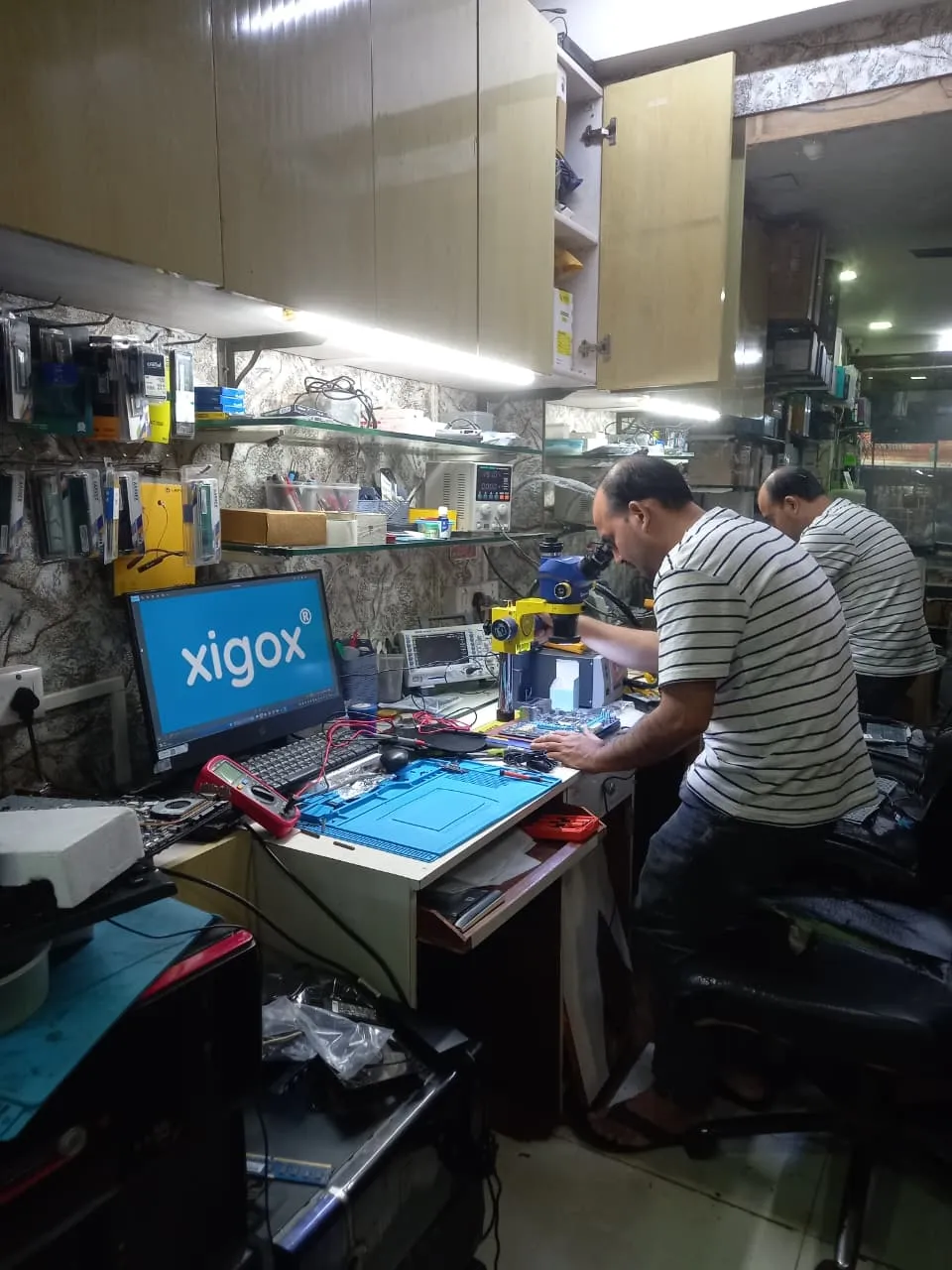
Xigox technicians at the repair bench

Quick facts

Typical price

₹1,499–₹8,000+

Turnaround

same day

Warranty

90-day warranty

Professional Laptop & Computer Router Configuration in Juchandra

Skip the directories. Book direct for transparent pricing with Xigox. Seeking professional Laptop & Computer Router Configuration in Juchandra? Look no further. At Xigox, our trained technicians deliver reliable Laptop & Computer Router Configuration for residents and businesses in Juchandra. We understand how frustrating a broken laptop can be, so we offer same-day pickup and drop in Juchandra.

Warranty & After-Service for Laptop & Computer Router Configuration

All this issue performed by Xigox in Juchandra comes with a written 90-day warranty covering parts and labour. Simply put, if the same issue recurs within 90 days, we redo it completely free. Xigox issues a printed warranty receipt every single time, so you know exactly what is covered.

After-Repair Speed Laptop & Computer Router Configuration

Following a professional repair in Juchandra, you can expect significantly better performance: faster boot times, lower fan noise, full-day battery performance, or crisp, bright display — based on what was fixed. Xigox performs a benchmark at the end of every repair in Juchandra to document the improvement.

Genuine Parts for Laptop & Computer Router Configuration

Quality matters for this issue. Because of this, our team strictly use genuine parts for your laptop. Instead of unbranded components, we use trusted supply chains. This is how we help your issue stay durable, supported by our standard 90-day warranty.

Our Laptop & Computer Router Configuration Process Step by Step

Getting your laptop fixed in Juchandra is incredibly simple. Step 1, call or WhatsApp us at +91 74997 61196 to describe your issue. Next, our complimentary collection driver arrives at your Juchandra doorstep within 1–2 hours. The team then carry out a thorough diagnostic (₹350, credited toward your repair). Once you agree, the repair is executed with genuine parts — and your laptop is returned to you. Most repairs done same day.

Budget-Friendly Laptop & Computer Router Configuration for Students & Educators

Are you a student in Juchandra? We know that a reliable laptop is critical for research. You get a written quote for this issue before any work starts, and our technicians suggest the lowest-cost fix that will last, such as a part repair instead of a full replacement. Mention your exam or submission date when you book and we plan the job around it. Stop letting hardware problems disrupt your studies — contact us for student-friendly this issue.

Top-Rated Laptop & Computer Router Configuration in Juchandra

There are many repair shops in Juchandra, however, Xigox stands out for the repair. We believe in total honesty. Each repair begins with a thorough diagnostic inspection for ₹350, which is fully refunded if you proceed. No surprise fees — only expert repair in Juchandra.

Transparent Inspection in Juchandra

Not sure what's wrong with your laptop? Before you commit to any issue, Xigox conducts a comprehensive hardware inspection. While we charge a nominal ₹350, this amount is fully refunded when you approve the quote. Our local experts will explain the exact fault clearly so you can make an informed decision.

Multi-Point Inspection after Laptop & Computer Router Configuration

Fixing the immediate problem is only half the job at Xigox. Before your laptop is returned in Juchandra, it must pass a comprehensive multi-point quality check. Our team ensures that the repair was successful, checking wi-fi connectivity. This level of testing is the reason for our 4.9★ rating across Juchandra.

Pickup & Drop Across Juchandra

We repair devices for homes, offices and colleges across Juchandra book us with free pickup and drop. You get a written quote before any work, OEM-grade parts and a 90-day warranty, whether it is one laptop or an office fleet. When you choose Xigox for this issue in Juchandra, you get the same service and warranty as every other customer.

Convenient Collection across Juchandra

Navigating traffic in Juchandra takes hours. To solve this, Xigox offers a no-hassle doorstep logistics service for the repair. Simply share your Juchandra address, and our secure courier will collect your laptop directly from you. Once the repair is finished, we safely return it in protective packaging. Enjoy total convenience without leaving your desk.

Countless satisfied customers across Mumbai, Thane and Palghar confirm our expertise. We're the go-to choice for Laptop & Computer Router Configuration in Juchandra. Every repair comes with a written warranty, genuine parts, and full honesty. Request your quote — WhatsApp us today.


· Verified by Xigox experienced technicians

Laptop & Computer Router Configuration — Pricing

Transparent pricing. ₹350 inspection fee (refunded if you proceed with repair). Exact quote before work starts. No hidden charges.

Issue / ComponentRepair PriceWarranty
Diagnosis & Basic Fix ₹499 - ₹999 90 Days
Standard Repair ₹999 - ₹2,499 90 Days
Advanced Repair ₹2,499 - ₹4,999 90 Days
Premium Service ₹3,499 - ₹6,999 90 Days

* Inspection fee ₹350 (refunded if you proceed with repair). Final price confirmed after diagnosis. No hidden charges.

Our process

How Juchandra Customers Get Laptop & Computer Router Configuration Done

We've streamlined every step to make Laptop & Computer Router Configuration in Juchandra fast, transparent, and worry-free.

  1. Step 1Step 1: Get In Touch with Our Team Free

    Get In Touch with Our Team

    Call, WhatsApp, or fill out our online form. Share your product type (laptop, desktop, all-in-one PC, printer) and the issue you're experiencing. We respond within minutes with repair availability.

  2. Step 2Step 2: Doorstep Service or Free Pickup

    Doorstep Service or Free Pickup

    For part replacements (battery, keyboard, screen, SSD, RAM), our technician visits your Juchandra doorstep. For chip-level and body repairs, free pickup and drop from your Juchandra address. Safe handling and padded transport. We cover the entire 401208 postal area with priority pickup scheduling.

  3. Step 3Step 3: Transparent Diagnosis & Quote

    Transparent Diagnosis & Quote

    Our experienced engineer diagnoses your laptop or computer at our lab. ₹350 inspection fee applies (fully refunded if you proceed with the repair). You receive a clear, itemised written quote before any repair work begins. No surprises, no hidden fees. Our 4.9★ rating across 9,727+ reviews reflects our commitment to thorough quality assurance.

  4. Step 4Step 4: Professional Repair with Genuine Parts

    Professional Repair with Genuine Parts

    Using OEM-grade components and manufacturer-approved techniques, our technicians repair your laptop or computer to factory-level quality. Most common repairs are completed the same day.

  5. Step 5Step 5: Free Delivery + 90-Day Warranty

    Free Delivery + 90-Day Warranty

    Your repaired laptop or computer is delivered back to your Juchandra doorstep at zero cost. Every repair includes a 90-day written warranty covering parts and labour. Trusted by customers across Palghar district — 4.9★ rated.

Don't wait — book your repair from Juchandra today. Doorstep service for part replacements, free pickup for lab repairs. Same-day service available.

How it's done

How We Perform Laptop & Computer Router Configuration

What our technicians do, what it requires, and how to tell you need it.

1 How It's Performed

For a repair job on this component, we connect the device to your network directly, confirm it's assigned a stable address rather than one that changes and breaks the connection later, and test printing/connecting from more than one device on the network before considering setup complete.

Typical time: 20–40 minutes

2 What This Requires

  • Your network's WiFi credentials, or a direct Ethernet connection if WiFi isn't in use.
  • Confirmation of how many devices need to connect, since each one needs its own driver installed even once the printer/device itself is online.

3 When You Need This

  • Setting up a new device for the first time.
  • An existing connection keeps dropping or needs to be re-paired after every router restart.
  • You've moved to a new network (new home/office, new router) and need the device reconnected.

Who repairs your device

Repaired in-house by Xigox technicians

Laptop & Computer Router Configuration is handled by Xigox technicians from start to finish, never handed on to another shop. Work that needs the repair bench is done at our workshop in Virar West.

Board-level faults are traced with a microscope, a multimeter and a soldering station before any part is replaced, and parts are fitted only after you approve the quote.

We don't open your personal files during a repair. When a job needs access to your data, such as data recovery or a Windows reinstall, we ask you first.

  • Repaired in-house, not outsourced
  • Quote approved by you before work starts
  • Your files stay private
  • Microscope and board-level tools
  • Genuine or OEM-grade parts
  • 90-day warranty on repairs
Technician inspecting a laptop motherboard under a microscope at the repair bench Technician testing a laptop mainboard with a multimeter beside a Xigox-branded monitor Technician brushing dust off an opened laptop motherboard with a cleaning brush Technician inspecting a laptop motherboard under a microscope at the repair bench
Xigox technicians at the repair bench.

Why Xigox?

Why Choose Xigox for Laptop & Computer Router Configuration?

Over 9,727+ reviewers across Mumbai trust Xigox for professional, transparent and affordable Laptop & Computer Router Configuration. Conveniently located near Naigaon-Bhiwandi Road.

Transparent Pricing

₹350 inspection fee (refunded if you proceed with repair). Exact written quote before we start. No surprise charges — ever.

Post-Repair WhatsApp Support

WhatsApp support after every Laptop & Computer Router Configuration job. We answer laptop and computer questions — always free.

Free Pickup & Delivery

Collection and return anywhere in Juchandra at no charge. Doorstep Laptop & Computer Router Configuration costs the same as bringing it to us — we do not bill convenience.

No Fix, No Repair Fee

If we cannot resolve your Laptop & Computer Router Configuration issue you pay nothing beyond the inspection, and the device comes back exactly as we received it.

Open 7 Days, 9 AM–9 PM

Including Sundays and public holidays. Weekend and evening slots in Juchandra are usually the easiest to book.

Live Status on WhatsApp

Updates at collection, diagnosis, quote, completion and dispatch — and you reply straight to the technician handling your Laptop & Computer Router Configuration, not a helpline.

Repairs Completed
1,00,141+
Since 2011
Average Rating
4.9 ★
9,727+ reviews
Repair Warranty
90 Days
Parts & labour
Avg Response
30 Min
For common issues
Pickup & Drop
Free
₹350 inspection fee
Est. Since
2011
15+ yrs in Palghar

Xigox vs Other Laptop & Computer Router Configuration Options in Juchandra

What Xigox puts in writing, and what to ask any other shop or listing

FeatureXigoxOther shops & listings
Experienced Technicians YesVaries; ask who will work on the device
Transparent Pricing (₹350 Inspection) YesVaries; ask for a written quote first
90-Day Warranty YesVaries; ask for the warranty in writing
Free Pickup & Drop YesVaries; ask whether pickup is free
Genuine Parts OEM PartsVaries; ask which part will be fitted
Same-Day Service Most RepairsVaries; ask for a time in writing
ISO 9001 Certified YesVaries; ask for their certificate

Repair examples

Recently Repaired Laptops & Computers

View All Recent Repairs

Lenovo

IdeaCentre AIO 3 24

Fixed
Issue
Screen completely dark but faint image visible under flashlight. System running fine — audio and USB all working.
Solution
Diagnosed failed LED backlight driver board. Replaced driver IC and tested backlight uniformity across all zones. Full brightness restored.

Technician's note

Backlight driver MOSFET shorted due to power surge. Recommended surge protector for prevention.

Thane West 2 Hours
  • Lenovo
  • All-in-One
  • Backlight

Apple

iMac 27-inch (2019)

Fixed
Issue
iMac extremely slow — taking 5 minutes to boot. Fusion Drive HDD component failing with reallocated sectors.
Solution
Removed failing Fusion Drive. Installed 1TB NVMe SSD via PCIe adapter. Cloned macOS Ventura with all data intact. Applied fresh thermal past...

Technician's note

SMART data showed 847 reallocated sectors on MQ01ABD100 HDD. New SSD benchmarks 2,800 MB/s read. Boot time now 12 seconds.

Bandra West 3.5 Hours
  • iMac
  • SSD Upgrade
  • Fusion Drive

HP

ProDesk 400 G7

Fixed
Issue
Desktop not powering on. Power button LED blinking 5 times — indicates motherboard failure per HP diagnostics.
Solution
Found 3 bulging capacitors near CPU VRM section. Replaced all faulty capacitors with same-spec rated components. Tested under load for stabi...

Technician's note

Capacitor failure likely caused by prolonged voltage fluctuation. Recommended UPS installation.

Malad West 3 Hours
  • HP
  • Motherboard
  • Capacitor

Custom

Build (AMD Ryzen 7)

Fixed
Issue
Client wanted to upgrade from GTX 1660 to RTX 4070. Existing 450W PSU insufficient for new GPU.
Solution
Installed Corsair RM750e PSU with proper cable management. Mounted RTX 4070 with support bracket. Updated BIOS and installed latest drivers....

Technician's note

Old PSU only had one 8-pin PCIe connector. New 750W provides clean, stable power for the RTX 4070.

Andheri East 2.5 Hours
  • Gaming PC
  • GPU Upgrade
  • PSU

HP

LaserJet M428fdw

Fixed
Issue
Scanner producing black lines across scanned documents. ADF feeding but scanner output corrupted.
Solution
Replaced cracked ADF scanner glass strip. Cleaned flatbed scanner glass and calibration strip. Tested scan-to-email and copy functions.

Technician's note

Hairline crack in CIS scanner glass invisible to naked eye but caused consistent vertical line artifact.

Vikhroli East 1.5 Hours
  • HP
  • MFP
  • Scanner

Epson

L805

Fixed
Issue
Photo prints showing incorrect colors — skin tones appearing greenish. Color banding visible in gradient areas.
Solution
Performed nozzle check and deep cleaning. Ran ICM color profile calibration. Aligned print head for optimal dot placement.

Technician's note

Light cyan channel was partially blocked. After 3 cleaning cycles and manual alignment, color accuracy restored to factory spec.

Dadar West 2.5 Hours
  • Epson
  • Photo Printer
  • Color Calibration

Customer reviews

What Customers Say About Laptop & Computer Router Configuration in Juchandra

4.9/5 · 18 reviews shown

See all 9,727+ reviews

MSI Modern AM242 AIO — Memory Expansion

“My MSI Modern AM242 AIO came with only eight gigabytes of RAM from the factory which was causing severe performance issues as my workflow involves simultaneously running web development tools, multiple browser instances for testing, a local database server, and communication applications. The system would constantly swap to disk making everything painfully slow. The Xigox Santacruz technician identified the exact RAM specification compatible with my all-in-one model, sourced two sixteen-gigabyte DDR4 modules for a total of thirty-two gigabytes in dual-channel configuration, and carefully opened the rear panel to install them. Since all-in-one computers have very limited internal space, the installation required precision and expertise to avoid damaging the tightly packed components. After enabling the XMP profile in BIOS the system runs beautifully with absolutely zero slowdown no matter how many applications I run simultaneously. Fantastic upgrade work — I have already recommended Xigox to three of my colleagues.”
A Akanksha Tiwari Juchandra · 4 Feb 2026 17

Acer Veriton Z AIO — Memory Expansion

“My Acer Veriton Z AIO came with only eight gigabytes of RAM from the factory which was causing severe performance issues as my workflow involves simultaneously running web development tools, multiple browser instances for testing, a local database server, and communication applications. The system would constantly swap to disk making everything painfully slow. The Xigox Juhu technician identified the exact RAM specification compatible with my all-in-one model, sourced two sixteen-gigabyte DDR4 modules for a total of thirty-two gigabytes in dual-channel configuration, and carefully opened the rear panel to install them. Since all-in-one computers have very limited internal space, the installation required precision and expertise to avoid damaging the tightly packed components. After enabling the XMP profile in BIOS the system runs beautifully with absolutely zero slowdown no matter how many applications I run simultaneously. Stellar upgrade work — They turned what I thought was a write-off into a perfectly working device.”
R Rishi Khanna Juchandra · 5 Nov 2025 7

ASUS ProArt Station PA602 — Memory Expansion

“My ASUS ProArt Station PA602 came with only eight gigabytes of RAM from the factory which was causing severe performance issues as my workflow involves simultaneously running web development tools, multiple browser instances for testing, a local database server, and communication applications. The system would constantly swap to disk making everything painfully slow. The Xigox Bandra technician identified the exact RAM specification compatible with my all-in-one model, sourced two sixteen-gigabyte DDR4 modules for a total of thirty-two gigabytes in dual-channel configuration, and carefully opened the rear panel to install them. Since all-in-one computers have very limited internal space, the installation required precision and expertise to avoid damaging the tightly packed components. After enabling the XMP profile in BIOS the system runs beautifully with absolutely zero slowdown no matter how many applications I run simultaneously. First-rate upgrade work — This is, without doubt, the most professional repair shop in Mumbai.”
S Smita Patil Boisar · 12 Oct 2025 12

Lenovo IdeaCentre AIO 3 — Memory Expansion

“My Lenovo IdeaCentre AIO 3 came with only eight gigabytes of RAM from the factory which was causing severe performance issues as my workflow involves simultaneously running web development tools, multiple browser instances for testing, a local database server, and communication applications. The system would constantly swap to disk making everything painfully slow. The Xigox Vile Parle technician identified the exact RAM specification compatible with my all-in-one model, sourced two sixteen-gigabyte DDR4 modules for a total of thirty-two gigabytes in dual-channel configuration, and carefully opened the rear panel to install them. Since all-in-one computers have very limited internal space, the installation required precision and expertise to avoid damaging the tightly packed components. After enabling the XMP profile in BIOS the system runs beautifully with absolutely zero slowdown no matter how many applications I run simultaneously. Superb upgrade work — Customer for life — the quality and honesty here are unmatched.”
G Gaurav Mishra Vile Parle · 18 Oct 2024 30

HP Envy 34 AIO — Memory Expansion

“My HP Envy 34 AIO came with only eight gigabytes of RAM from the factory which was causing severe performance issues as my workflow involves simultaneously running web development tools, multiple browser instances for testing, a local database server, and communication applications. The system would constantly swap to disk making everything painfully slow. The Xigox Vashi technician identified the exact RAM specification compatible with my all-in-one model, sourced two sixteen-gigabyte DDR4 modules for a total of thirty-two gigabytes in dual-channel configuration, and carefully opened the rear panel to install them. Since all-in-one computers have very limited internal space, the installation required precision and expertise to avoid damaging the tightly packed components. After enabling the XMP profile in BIOS the system runs beautifully with absolutely zero slowdown no matter how many applications I run simultaneously. Tremendous upgrade work — I will always choose Xigox for any electronic repairs going forward.”
D Divya Reddy Juchandra · 9 May 2025 35

Dell OptiPlex 7410 AIO — Memory Expansion

“My Dell OptiPlex 7410 AIO came with only eight gigabytes of RAM from the factory which was causing severe performance issues as my workflow involves simultaneously running web development tools, multiple browser instances for testing, a local database server, and communication applications. The system would constantly swap to disk making everything painfully slow. The Xigox Kurla technician identified the exact RAM specification compatible with my all-in-one model, sourced two sixteen-gigabyte DDR4 modules for a total of thirty-two gigabytes in dual-channel configuration, and carefully opened the rear panel to install them. Since all-in-one computers have very limited internal space, the installation required precision and expertise to avoid damaging the tightly packed components. After enabling the XMP profile in BIOS the system runs beautifully with absolutely zero slowdown no matter how many applications I run simultaneously. World-class upgrade work — The follow-up call after the repair really showed they care about customers.”
D Deepak Singh Kurla · 31 Jul 2025 34
Page 1 / 3

← Swipe or tap dots to browse →

FAQ

Frequently Asked Questions — Laptop & Computer Router Configuration

Everything you need to know about Laptop & Computer Router Configuration in Juchandra

10 questions answered

Most repairs completed within 2-6 hours. Complex issues may take 1-2 days. We provide estimated timelines after diagnostic.
Yes, all repairs come with a 90-day warranty covering parts and workmanship.
Costs depend on the specific issue and device. You get a detailed written quote after the ₹350 inspection, which is credited to the repair.
Yes — Xigox operates 9 AM to 9 PM, seven days a week in Juchandra, including Sundays and public holidays. Weekend pickups are often the most convenient option for people who cannot be at home on a working day. Our service covers the full 401208 postal area in Juchandra.
Yes, on request. Any component we remove during Laptop & Computer Router Configuration is yours, and we will hand it back with the repaired laptop or computer so you can see exactly what was changed. Just mention it when you approve the quote. Customers across Juchandra (401208) enjoy priority same-day scheduling.
The cost of Laptop & Computer Router Configuration in Juchandra depends on your laptop or computer model and the extent of damage. Xigox charges ₹350 for inspection — refunded if you proceed with the repair — you'll receive a transparent, written quote with no hidden charges. Most standard Laptop & Computer Router Configuration jobs start from ₹499. Call or WhatsApp +91 74997 61196 for an instant estimate. Our service covers the full 401208 postal area in Juchandra.
Most Laptop & Computer Router Configuration jobs in Juchandra are completed the same day — usually within 2–4 hours of pickup. Complex repairs such as motherboard replacement or liquid-damage recovery may take 1–2 days. We'll give you an accurate time estimate during the inspection. Free pickup also available in Chinchoti, Naigaon East, Bhabola and surrounding areas.
Yes — Xigox provides completely free doorstep pickup and delivery for Laptop & Computer Router Configuration across Juchandra. An experienced technician collects your laptop or computer from your home or office, completes the repair at our workshop, and returns it — often the same day. Call or WhatsApp +91 74997 61196 to book. We've been serving Palghar district for over 15 years.
Every Laptop & Computer Router Configuration at Xigox includes a 90-day warranty on the repaired component and all parts used. If the same issue recurs within 90 days, we fix it at zero cost. This warranty applies to all Laptop & Computer Router Configuration completed in Juchandra and across Mumbai MMR. Customers near Naigaon-Bhiwandi Road in Juchandra are covered by our free pickup.
We use OEM-quality or manufacturer-grade components for all Laptop & Computer Router Configuration work. Genuine-grade parts ensure your laptop or computer performs exactly as designed and your 90-day repair warranty stays valid. We never use substandard aftermarket parts without your prior consent. Trusted by customers throughout Palghar — rated 4.9★ across 9,727+ reviews.

Still have questions?

Send us your question on WhatsApp or call — a technician will answer.

Explore more services

More Repair & Tech Services Near Juchandra

Same technicians · Free pickup · 90-day warranty across all services.

Book a repair

Book Laptop & Computer Router Configuration — Free Pickup

Get your laptop or computer fixed today. Fill in 4 fields and we'll call within 1 hour.

Booking received

We'll call you within 1 hour to confirm your appointment and arrange doorstep pickup.

Inspection fee: ₹350

  • Credited to your total repair cost if you go ahead.
  • Still applies if the device can't be repaired or you decline the repair.

+91

Device type *

Inspection fee: ₹350

  • If you go ahead with the repair, the ₹350 is credited to your total repair cost.
  • If the device can't be repaired or you decide not to continue, the ₹350 inspection fee still applies.

Your details are used only to arrange this repair. By submitting, you agree to our Privacy Policy.

Get Your Laptop or Computer Fixed Today

Laptop & Computer Router Configuration in Juchandra. Free pickup • 90-day warranty • Genuine parts

Open All Days · 9 AM – 9 PM · Reply within 15 minutes

Service area

Laptop & Computer Router Configuration in Juchandra — Service Area & Coverage

Xigox provides laptop & computer router configuration across Juchandra (PIN 401208), in the Palghar district of Naigaon. Our doorstep pickup and on-site service cover the entire Juchandra area and the neighbourhoods around it.

Localities we cover in Juchandra: Naigaon East, Virar. Wherever you are in Juchandra, we can collect your device from your door and bring it back after the repair.

Our technicians regularly serve homes, societies and offices around Juchandra Village, Naigaon Station and Chinchoti Waterfall (nearby), and along Juchandra Road, Naigaon-Bhiwandi Road and SH-43. If you're near any of these landmarks, same-day pickup for laptop & computer router configuration is almost always available.

Laptop & Computer Router Configuration near Juchandra

We also serve these nearby areas — tap your locality for local laptop & computer router configuration:

Laptop & Computer Router Configuration price in Juchandra — know it before you book

  1. 1Pick your device & issue
  2. 2See the real price range
  3. 3Free doorstep pickup in Juchandra

4.9 from 9,727 customer reviews across all repairs · upfront pricing · 90-day warranty

Before you book: have your device model and a quick description of the issue ready — it speeds up your quote.

Nearest branch: Bhayandar West

~4.8 km from Juchandra. With free doorstep pickup you don't need to travel — this is our nearest branch.

Call WhatsApp