Canon
PIXMA G620
- Issue
- Color prints showing streaks, missing cyan. Nozzle blocked.
- Solution
- Deep chemical cleaning of print head. Restored all color channels.
Bandra East
1 Hours
- Inkjet
- Canon
- Head Clean
 Samsung · Printer Power Button Not Working Repair · Andheri
Professional Printer Power Button Not Working Repair for your Samsung laptop or computer in Andheri. Experienced technicians, OEM-grade parts & 90-day warranty.
Open 9 AM – 9 PM · 7 days · Free pickup from Andheri & nearby areas
Everything included in your Samsung Printer Power Button Not Working Repair service at Xigox Andheri
Experienced Technicians
Our engineers are specifically trained on Samsung hardware for precise, model-accurate repairs.
OEM-Grade Parts
We use genuine or grade-A compatible Samsung components — no cheap, unreliable substitutes.
90-Day Warranty
Every Samsung Printer Power Button Not Working Repair job comes with a full 90-day written warranty.
₹350 Inspection (refunded if you proceed with repair)
We inspect your Samsung laptop for ₹350 before any work begins — fee refunded if you proceed with the repair.
Free Doorstep Pickup
Free laptop pickup and delivery within your area. No need to visit a service centre.
Fast Turnaround
Most Samsung Printer Power Button Not Working Repair repairs are completed same-day or within 24 hours.
All Work Backed by 90-Day Warranty
Free re-repair within 90 days if the same issue recurs. No questions asked.
Understand why expert service protects your Samsung laptop or computer and extends its lifespan
Professional Printer Power Button Not Working Repair restores your Samsung Printer to its intended performance level.
Addressing repair needs early prevents minor issues from escalating into major hardware failures.
Repair is significantly cheaper than replacement. We maximise your Samsung laptop's useful lifespan.
Our technicians are trained specifically on Samsung hardware quirks, ensuring precise and lasting repairs.
Transparent pricing · No hidden fees · Pay only after service is complete
| Service | Estimated Cost | Warranty |
|---|---|---|
| Power Diagnosis | ₹499 - ₹999 | 90 Days |
| Power Jack/Button Repair | ₹849 - ₹1,599 | 90 Days |
| Power Supply Repair | ₹1,499 - ₹3,499 | 90 Days |
| Power Supply Replacement | ₹2,899 - ₹6,999 | 90 Days |
Final quote provided after free laptop or computer inspection. Work starts only with your approval.
Get Exact QuoteWhy Us?
With 1,00,488+ successful repairs and a 4.9-star rating, Xigox is an independent Samsung repair specialist serving Andheri. Conveniently located near New Link Road.
We quote before starting work. No hidden fees. You pay exactly what you were quoted.
Free WhatsApp support for any questions about your Samsung Printer Power Button Not Working Repair after repair — always.
Collection and return anywhere in Andheri at no charge for lab-based Samsung work — we don't bill for convenience.
₹350 inspection fee (refunded if you proceed). Written quote before any Samsung Printer Power Button Not Working Repair work begins.
If we cannot resolve your Samsung Printer Power Button Not Working Repair issue, you pay nothing beyond the inspection fee.
We repair Samsung hardware at chip and board level where it's safe to do so — often a fraction of a full-module swap.
Who repairs your device
Your Samsung is handled by Xigox technicians from start to finish. It is never handed on to another shop. Work that needs the repair bench is done at our workshop in Virar West.
Board-level faults are traced with a microscope, a multimeter and a soldering station before any part is replaced, and parts are fitted only after you approve the quote.
We don't open your personal files during a repair. When a job needs access to your data, such as data recovery or a Windows reinstall, we ask you first.
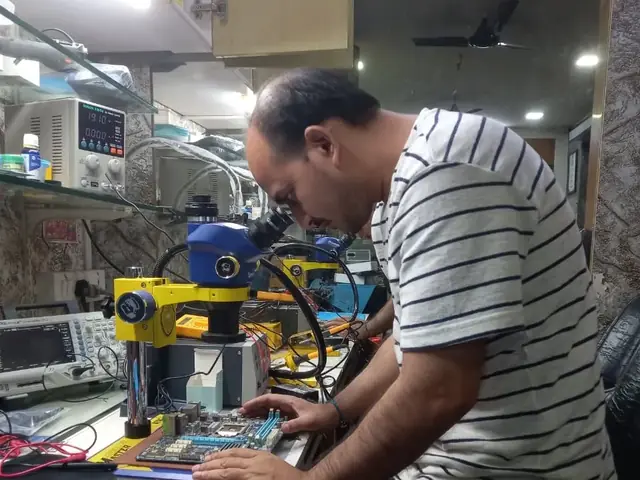
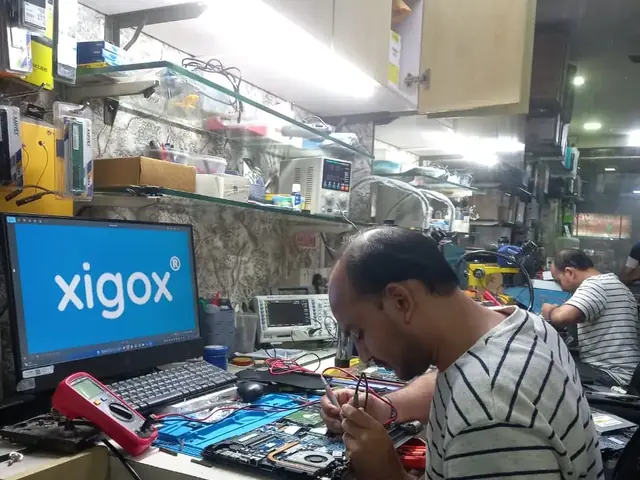
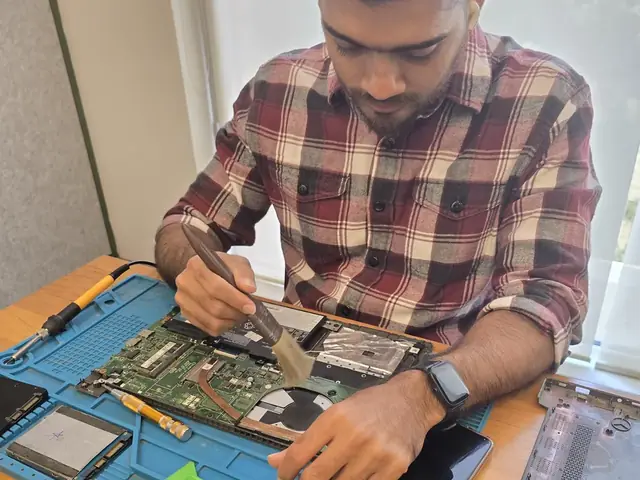
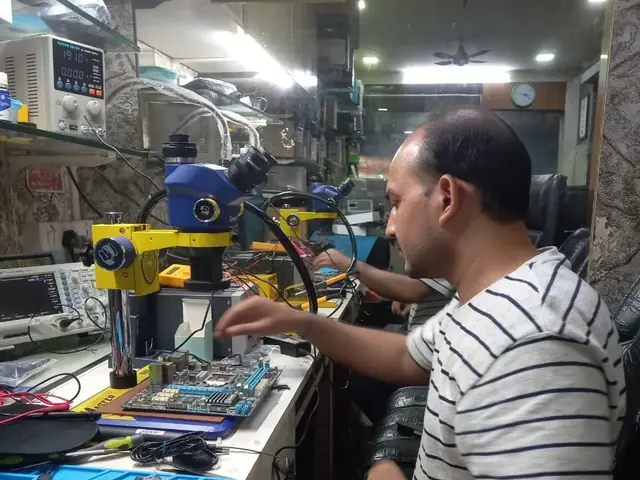
From booking to delivery — transparent, efficient, and professional every step of the way
Call, WhatsApp or book online. Tell us you need Printer Power Button Not Working Repair for your Samsung laptop or computer in Andheri. We'll confirm within minutes.
An experienced technician picks up your Samsung laptop or computer from your Andheri address at no cost. No travel required.
Your Samsung laptop or computer is assessed by a specialist trained on Samsung hardware. Full written inspection report — ₹350 fee refunded if you proceed with repair.
We provide a detailed repair quote for Printer Power Button Not Working Repair. Work only starts after your explicit written approval — no hidden charges ever.
Our Samsung specialists perform Printer Power Button Not Working Repair using OEM-grade parts and professional-grade tools. multi-point quality check included.
Your Samsung laptop or computer is returned to your Andheri address with a written 90-day warranty. If the same issue recurs, we fix it free.
Customer reviews
4.9/5 · 12 reviews shown
← Swipe or tap dots to browse →
Repair examples
Canon
PIXMA G620
Samsung
Xpress M2835DW
Technician's note
Drum surface had scratches causing line defects. Drum at 150%% of rated life — impressive longevity.
Epson
L805
Technician's note
Light cyan channel was partially blocked. After 3 cleaning cycles and manual alignment, color accuracy restored to factory spec.
Canon
PIXMA G3010
Technician's note
Pickup rollers had glazed surface from high humidity. Used genuine Canon rollers for best grip.
HP
LaserJet M428fdw
Technician's note
Hairline crack in CIS scanner glass invisible to naked eye but caused consistent vertical line artifact.
HP
LaserJet Pro M404dn
Technician's note
Fuser exceeded rated page count of 100K. Recommended replacement every 80K pages for consistent output.
Watch & learn
Repair videos from our Virar West workshop
See how Xigox handles real customer repairs — fast diagnosis, transparent pricing and a 90-day warranty on every job.

A closer look at the Xigox team, our tools, and the repair process behind 9,605+ customer reviews across Mumbai MMR.

A tour of our ISO 9001:2015 certified workshop — laptop, desktop and computer repairs with genuine-grade parts and a 90-day warranty.

How the Xigox team handles laptop and computer repair, sales, service and data recovery across Mumbai, Thane & Palghar.
FAQ
Everything you need to know before booking your service
10 questions answered
Send us your question on WhatsApp or call — a technician will answer.
Xigox is Andheri's leading independent specialist for Samsung Printer repair. Our engineers are not generalists — they undergo dedicated training on Samsung hardware, firmware and diagnostics. Since 2011, we have completed over 1,00,000+ repairs across all Samsung product lines, earning a 4.9-star average customer rating.
Parts for Samsung Printer models are held in stock rather than ordered after you book, so most repairs are not waiting on a supplier. Screens, batteries, keyboards, charging boards and flex cables are all OEM-grade. You approve a written estimate first, and the ₹350 inspection is credited back against the repair.
We actively serve the entire 400058 postal area within Mumbai Suburban district, ensuring same-day response for every repair request. ₹350 inspection fee (refunded if you proceed with repair). Located near New Link Road, our service coverage extends across Andheri and all surrounding localities. In addition to Andheri, we also provide doorstep repairs and free pickup for lab work for customers in Andheri East, SEEPZ, MIDC Andheri and other nearby areas.
How your Samsung Printer gets serviced depends on the fault. Part swaps happen on-site anywhere in Andheri; board-level work goes to the bench because it needs proper rework equipment. Either way collection and return are free, and you get progress updates rather than having to chase us.
We back Samsung work with a 90-day parts-and-labour warranty in writing, not just a verbal promise. If your Printer does come back with the same fault, we cover it. You keep a direct WhatsApp line to the team that did the work.
Service Hours
Monday – Sunday · 9 AM – 9 PM
Open on all public holidays
Service Area
Andheri & surrounding Mumbai areas
Doorstep repairs + free pickup for lab work
Our Guarantee
90-day warranty on all repairs
Free re-repair if same fault recurs
Product lines
Samsung does not build one printer — it builds 6 separate series, and Printer Power Button Not Working Repair is a different job on each. Xigox services DM, Expert, Galaxy Book and ProXpress and the rest of the Samsung range. We regularly take in DM, Expert, Galaxy Book and ProXpress, along with Smart and Xpress units for Printer Power Button Not Working Repair in Andheri. Specific Samsung models on our current service list include Samsung ProXpress M3320ND, Samsung Xpress M2020W and Samsung Xpress M2876ND. If your Samsung model is not listed, it is almost certainly still covered — send us the model number on the base sticker and we will confirm parts availability before you book.
The Samsung ProXpress M3320ND is part of Samsung's ProXpress business printer line — laser printing built for small-office document volume.
Worth knowing for this repair: Toner-based laser printing — low per-page cost for office document volume.
The Samsung Xpress is part of Samsung's Xpress printer line — compact laser printers for home or small-office document printing.
Worth knowing for this repair: Toner-based laser printing in a compact form factor.
Guides
Written by the Xigox workshop team — diagnostics, cost breakdowns and step-by-step fixes you can read before you book.
A practical HP printer troubleshooting guide covering DeskJet, Smart Tank, OfficeJet and LaserJet families, ca...
7 min read Brand GuideLearn when a Canon print head needs cleaning, how to read the nozzle check, the right cleaning ladder for PIXM...
5 min read Brand GuideHow to keep an Epson EcoTank printing cleanly: a simple weekly and monthly routine, correct refilling, safe he...
6 min read Printer TipsWhere paper jams in inkjets, lasers, feeders and duplex printers, how to reach each jam, a seven-step clearing...
4 min readSelect your Samsung model for model-specific service details and pricing
Complete range of Samsung repair and upgrade services at Xigox
Not sure if it's a Printer Power Button Not Working Repair issue? Check these common Samsung problems
Free pickup & drop across all these neighbourhoods
Free doorstep pickup available in all these areas
Explore more services
Same technicians · Free pickup · 90-day warranty across all services.
Free doorstep pickup · Expert Printer Power Button Not Working Repair · 90-day warranty
Serving Andheri and all of Mumbai MMR · Open 9 AM – 9 PM daily
Comparison
What you get with Xigox in Andheri, side by side.
| Feature | Xigox | Other shops |
|---|---|---|
| Experienced Technicians | Trained & Verified | Varies; ask who will work on the device |
| Genuine / OEM Parts | OEM-Quality Parts | Varies; ask which part will be fitted |
| 90-Day Warranty | Written Certificate | Varies; ask for the warranty in writing |
| Diagnosis / Inspection | ₹350, credited to the repair | Varies; ask what the diagnosis costs |
| Same-Day Turnaround | Andheri — Most Repairs | Varies; ask for a time in writing |
| Free Doorstep Pickup | Andheri — Free | Varies; ask whether pickup is free |
| Transparent Pricing | Written Quote First | Varies; ask for a written quote first |
| Live WhatsApp Updates | Real-time Repair Status | Varies; ask how you will get updates |
Xigox charges ₹350 for inspection — credited to your repair cost if you go ahead.
How it's done
What our technicians do, what it requires, and how to tell you need it.
For this specific fault, our technicians test for charging while gently flexing the cable at the port (a quick way to reveal a loose internal connection), then open the chassis to inspect and repair or replace the jack itself, reinforcing the solder joints to the motherboard where that was the original failure point.
Typical time: 30–45 minutes
Why waste time on aggregators? Get direct service without middleman markup with Xigox. Samsung Printer Power Button Not Working Repair requires different diagnostic skills — diagnosing whether it's a drum, cartridge, or mechanical fault requires specific training. Xigox's printer technicians are specialists in inkjet and laser technology: inkjet head servicing, laser component overhaul. Most Samsung Printer Power Button Not Working Repair jobs are completed same-day.
A common question is whether an extended warranty applies to the repair. Xigox supports insurance claims and can provide the itemised bill your insurer needs — including parts cost, labour cost, and fault description. When manufacturer warranty has expired, third-party repair is typically usually cheaper compared to the official service centre.
Your private information is fully protected during your issue. Residents across Andheri rely on Xigox because we follow strict data privacy protocols. During the issue, your photos, emails, and passwords are completely secure. In cases where OS reinstallation is required, we will always inform you first.
You have options in Andheri, but Xigox is the preferred choice for the repair. Our core values include complete transparency. Every repair starts with a detailed hardware check costing just ₹350, refunded if you proceed. No hidden charges — just professional repair in Andheri.
Not everyone in Andheri can handle complex this issue. Xigox's engineers work on Samsung hardware every day specifically for Samsung hardware. Whether it's a minor fix or advanced component-level motherboard repair, we fix it properly right here for Andheri clients.
Curious how quickly Xigox can complete repair in Andheri? Here's our typical timeline: Step 1 — message us and our pickup technician arrives at your Andheri address within 2 hours. Step 2 — our inspection identifies the exact fault. Next — you give the go-ahead via WhatsApp — completely your decision. Finally — the repair is executed using genuine parts at our Virar West workshop, often same day. Then — we return it to you fully tested.
Navigating traffic in Andheri takes hours. To solve this, Xigox offers a no-hassle doorstep logistics service for this issue. Simply share your Andheri address, and our secure courier will collect your Samsung directly from you. Once the issue is finished, we safely return it in protective packaging. Enjoy total convenience without leaving your desk.
Longevity matters for the repair. Because of this, our team strictly use OEM-grade parts for your Samsung. Instead of grey-market components, we use trusted supply chains. This is how we help your repair stay durable, supported by our standard 90-day warranty.
Every issue completed by Xigox in Andheri comes with a documented three-month warranty on parts and labour. That means, if anything goes wrong within 3 months, we fix it at zero extra cost. You get a written warranty card with every issue, so the terms are clear.
We repair devices for homes, offices and colleges across Andheri book us with free pickup and drop. You get a written quote before any work, OEM-grade parts and a 90-day warranty, for a single Samsung or a whole office. When you choose Xigox for the repair in Andheri, you get the same service and warranty as every other customer.
Fixing the immediate problem is only half the job at Xigox. Prior to delivery in Andheri, it must pass a comprehensive multi-point quality check. Our team ensures that the issue was successful, checking wi-fi connectivity. This level of testing is the reason for our 4.9★ rating across Andheri.
Time is money in Andheri. This is why we offer a fast, transparent, doorstep Samsung Printer Power Button Not Working Repair that just works. No waiting in queues — only honest, warranty-backed repairs. Call +91 74997 61196 to book your free Andheri pickup.
Service area
Xigox provides samsung printer power button not working repair across Andheri (PIN 400058), in the Mumbai Suburban district of Mumbai. Our doorstep pickup and on-site service cover the entire Andheri area and the neighbourhoods around it.
Localities we cover in Andheri: Andheri West, Andheri East, DN Nagar, Four Bungalows, Seven Bungalows, Lokhandwala, Oshiwara, Versova, MIDC Andheri, SEEPZ, Marol, Saki Naka. Wherever you are in Andheri, we can collect your device from your door and bring it back after the repair.
Our technicians regularly serve homes, societies and offices around Lokhandwala Complex, Infinity Mall, Citi Mall, Andheri Sports Complex, Gilbert Hill and Fun Republic, and along JP Road (Jagannath Purbhudas Road), S.V. Road, Link Road, Veera Desai Road, New Link Road and Jogeshwari-Vikhroli Link Road (JVLR). If you're near any of these landmarks, same-day pickup for samsung printer power button not working repair is almost always available.
We also serve these nearby areas — tap your locality for local samsung printer power button not working repair:
4.9 from 9,605 customer reviews across all repairs · upfront pricing · 90-day warranty
Before you book: have your device model and a quick description of the issue ready — it speeds up your quote.
Not sure what's wrong?
Tell us what your device is doing — we'll point you to the right repair, with real pricing and next steps.
Nearest branch: Andheri East
Under 1 km from Andheri in a straight line. With free doorstep pickup you don't need to travel — call or WhatsApp before you visit.
Book a repair
Free pickup · Genuine parts · 90-day warranty
We'll call you within 1 hour to confirm your appointment and arrange doorstep pickup.
Inspection fee: ₹350
Device type *
Inspection fee: ₹350
Your details are used only to arrange this repair. By submitting, you agree to our Privacy Policy.
Before you go
Book a free pickup online, send your model and the problem on WhatsApp for a price, or talk to a technician.
9,605+ customer reviews · 4.9★ average
 Brother
 Canon
 Epson
 HP
 Kyocera
 Ricoh