
Gaming
PC RTX 4080
- Issue
- No display output, fans spinning. No boot sequence.
- Solution
- Diagnosed motherboard failure. Replaced with compatible board.
Goregaon West
4 Hours
- Motherboard
- Gaming
- Display
 Dell · Computer Keyboard/Mouse Not Working · Kudan
Expert diagnosis & repair for Computer Keyboard/Mouse Not Working on your Dell device in Kudan. Free doorstep pickup, genuine parts & 90-day warranty.
Open 9 AM – 9 PM · 7 days · ₹350 inspection fee (refunded if you proceed with repair)

Common symptoms of Computer Keyboard/Mouse Not Working on Dell devices. Recognise 2 or more? Book a ₹350 inspection (refunded if you proceed with repair) now.
Some keys stuck, unresponsive or auto-repeating
Keys output wrong characters or double-type
Keyboard affected by liquid spill damage
Keycaps broken, popped off or missing entirely
Keyboard backlight not working or flickering
Built-in trackpad unresponsive or erratic
Don't Delay — Computer Keyboard/Mouse Not Working Gets Worse Over Time
Unaddressed hardware issues worsen and can lead to secondary damage, escalating repair costs significantly.
Knowing the root cause ensures a precise repair — not just a temporary fix.
Accidental drops, pressure or impact causing mechanical damage to internal components.
Water, beverages or humidity causing short circuits or corrosion on circuit boards.
Components degrade naturally with regular use — batteries, connectors and hinges most affected.
Factory faults that surface after the warranty period in certain production batches.
Transparent pricing · ₹350 inspection fee (refunded if you proceed with repair) first · Pay only after approval
| Repair Type | Estimated Cost | Warranty |
|---|---|---|
| Laptop & Computer External Keyboard Setup — Basic fix | ₹450 | 90 Days |
| Laptop & Computer External Keyboard Setup — Standard fix | ₹699 | 90 Days |
| Laptop & Computer External Keyboard Setup — Advanced fix | ₹999 | 90 Days |
| Laptop & Computer External Keyboard Setup — Complex case | ₹1,499 | 90 Days |
| Laptop & Computer Keyboard Liquid Damage — Basic fix | ₹1,499 | 90 Days |
| Computer Keyboard Replacement — Basic fix | ₹1,799 | 90 Days |
Final cost confirmed after ₹350 inspection (refunded if you proceed with repair). Work starts only with your approval.
Get Exact QuoteWhy Us?
With 1,00,227+ successful repairs and a 4.9-star rating, Xigox is an independent Dell repair specialist serving Kudan. Serving all addresses in the 401404 postal zone.
We repair Dell hardware at chip and board level where it's safe to do so — often a fraction of a full-module swap.
Our engineers work on Dell hardware regularly. Every repair is tested before return.
We use genuine Dell parts wherever available; otherwise OEM-compatible components.
Every repair backed by a written 90-day warranty. Same fault recurs? We fix it free of charge.
Most Dell Computer Keyboard/Mouse Not Working jobs in Kudan are completed same-day. Urgent service available for critical cases.
We quote before starting work. No hidden fees. You pay exactly what you were quoted.
Who repairs your device
Your Dell is handled by Xigox technicians from start to finish. It is never handed on to another shop. Work that needs the repair bench is done at our workshop in Virar West.
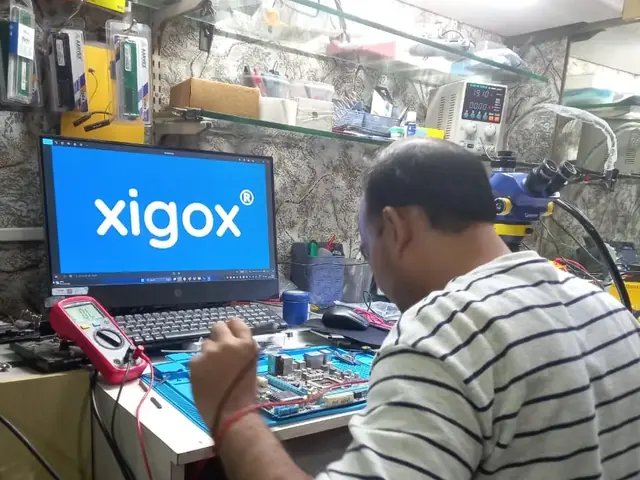
Board-level faults are traced with a microscope, a multimeter and a soldering station before any part is replaced, and parts are fitted only after you approve the quote.
We don't open your personal files during a repair. When a job needs access to your data, such as data recovery or a Windows reinstall, we ask you first.



Step-by-step from booking to delivery — complete transparency, no surprises
Call, WhatsApp or book online. Tell us about the Computer Keyboard/Mouse Not Working on your Dell desktop computer in Kudan. No technical expertise needed.
We pick up your Dell desktop computer from your Kudan address at no transport cost. Bring it to us or we come to you.
A Dell specialist examines your desktop computer and identifies the exact root cause of the Computer Keyboard/Mouse Not Working. Full written report provided — ₹350 fee refunded if you proceed with repair.
We share a detailed repair quote. Work begins only after your explicit approval — no hidden charges, no surprises.
Our engineers fix the Computer Keyboard/Mouse Not Working using OEM-grade Dell parts. A multi-point quality checklist is completed before your desktop computer is returned.
Your Dell desktop computer is returned to your Kudan address with a written 90-day warranty. Same fault recurs? We fix it free of charge.
Customer reviews
4.9/5 · 12 reviews shown
← Swipe or tap dots to browse →
Repair examples
Gaming
PC RTX 4080
Custom
Build (AMD Ryzen 7)
Technician's note
Old PSU only had one 8-pin PCIe connector. New 750W provides clean, stable power for the RTX 4070.
Dell
Vostro 3910
Technician's note
Infection via phishing email attachment. Trained customer on email safety and suspicious link identification.
HP
ProDesk 400 G9
Technician's note
Original HDD retained as secondary storage. Best ROI upgrade for any desktop.
ASUS
ROG Strix GT35
Technician's note
Thermal paste had completely dried out. Applied premium thermal compound rated for 8+ years.
HP
ProDesk 400 G7
Technician's note
Capacitor failure likely caused by prolonged voltage fluctuation. Recommended UPS installation.
Watch & learn
Repair videos from our Virar West workshop

See how Xigox handles real customer repairs — fast diagnosis, transparent pricing and a 90-day warranty on every job.

A closer look at the Xigox team, our tools, and the repair process behind 9,605+ customer reviews across Mumbai MMR.

A tour of our ISO 9001:2015 certified workshop — laptop, desktop and computer repairs with genuine-grade parts and a 90-day warranty.

How the Xigox team handles laptop and computer repair, sales, service and data recovery across Mumbai, Thane & Palghar.
FAQ
Everything you need to know before booking your inspection
10 questions answered
Send us your question on WhatsApp or call — a technician will answer.
Xigox is Kudan's leading independent specialist for Dell Computer repair. Our engineers are not generalists — they undergo dedicated training on Dell hardware, firmware and diagnostics. Since 2011, we have completed over 1,00,000+ repairs across all Dell product lines, earning a 4.9-star average customer rating.
Parts for Dell Computer models are held in stock rather than ordered after you book, so most repairs are not waiting on a supplier. Screens, batteries, keyboards, charging boards and flex cables are all OEM-grade. You approve a written estimate first, and the ₹350 inspection is credited back against the repair.
We actively serve the entire 401404 postal area within Palghar district, ensuring same-day response for every repair request. ₹350 inspection fee (refunded if you proceed with repair). Located near Palghar, our service coverage extends across Kudan and all surrounding localities. In addition to Kudan, we also provide doorstep repairs and free pickup for lab work for customers in Palghar, Palghar MIDC, Tembhode and other nearby areas.
How your Dell Computer gets serviced depends on the fault. Part swaps happen on-site anywhere in Kudan; board-level work goes to the bench because it needs proper rework equipment. Either way collection and return are free, and you get progress updates rather than having to chase us.
Your Dell Computer leaves with a written 90-day warranty covering both parts and labour. Same fault back inside that window and we redo it free — no argument, no diagnostic fee. WhatsApp support stays open afterwards for any question about the repair.
Service Hours
Monday – Sunday · 9 AM – 9 PM
Open on all public holidays
Service Area
Kudan & surrounding Mumbai areas
Doorstep repairs + free pickup for lab work
Our Guarantee
90-day warranty on all repairs
Free re-repair if same fault recurs
Product lines
Dell does not build one desktop — it builds 7 separate series, and Computer Keyboard/Mouse Not Working repair is a different job on each. Xigox services Alienware, Inspiron, Latitude and OptiPlex and the rest of the Dell range. We regularly take in Alienware, Inspiron, Latitude and OptiPlex, along with Precision, Vostro and XPS units for Computer Keyboard/Mouse Not Working repair in Kudan. Specific Dell models on our current service list include Dell Inspiron Desktop, Dell OptiPlex 7010, Dell Precision 3660 and Dell Vostro 3910. If your Dell model is not listed, it is almost certainly still covered — send us the model number on the base sticker and we will confirm parts availability before you book.
The Dell XPS 8960 is Dell's premium consumer desktop tower, offering stronger components and build quality than Inspiron desktops while remaining more accessible than the Precision workstation line.
The Dell Inspiron Desktop is Dell's mainstream consumer desktop tower — everyday home computing with straightforward, accessible internals for upgrades and repairs.
The Dell OptiPlex 7010 is Dell's business desktop line — small-form-factor and tower options built for corporate deployment, with an emphasis on manageability, security features, and long-term part availability.
Guides
Written by the Xigox workshop team — diagnostics, cost breakdowns and step-by-step fixes you can read before you book.
A desktop that will not start can be a dead socket, a tripped breaker, a failed PSU or a motherboard fault. Fo...
7 min read Computer GuideA desktop that beeps but will not boot is reporting a fault. Learn why beep codes vary by BIOS vendor, what co...
7 min read Gaming TipsA gaming PC that won't boot fails at power, POST, display or Windows. Match your symptom to the stage, then ru...
6 min read Computer RepairDesktop computer repair in Mumbai covers everything from a dead PSU (₹1,499) to chip-level motherboard repair...
5 min readSelect your specific Dell model for a more targeted diagnosis page
All common Dell hardware and software issues resolved with 90-day warranty
All Dell repair and upgrade services available at Xigox Kudan
Free pickup & drop across all these neighbourhoods
Free doorstep service available in all these nearby areas
Explore more services
Same technicians · Free pickup · 90-day warranty across all services.
₹350 Inspection (refunded if you proceed with repair) · Expert repair for Computer Keyboard/Mouse Not Working · 90-day warranty
Serving Kudan and all of Mumbai MMR · Open 9 AM – 9 PM daily
Comparison
What you get with Xigox in Kudan, side by side.
| Feature | Xigox | Other shops |
|---|---|---|
| Experienced Technicians | Trained & Verified | Varies; ask who will work on the device |
| Genuine / OEM Parts | OEM-Quality Parts | Varies; ask which part will be fitted |
| 90-Day Warranty | Written Certificate | Varies; ask for the warranty in writing |
| Diagnosis / Inspection | ₹350, credited to the repair | Varies; ask what the diagnosis costs |
| Same-Day Turnaround | Kudan — Most Repairs | Varies; ask for a time in writing |
| Free Doorstep Pickup | Kudan — Free | Varies; ask whether pickup is free |
| Transparent Pricing | Written Quote First | Varies; ask for a written quote first |
| Live WhatsApp Updates | Real-time Repair Status | Varies; ask how you will get updates |
Xigox charges ₹350 for inspection — credited to your repair cost if you go ahead.
Tired of middlemen? Work with the actual repair team — Xigox. Backlit keyboard failures on Dell in Kudan are commonly a connector issue rather than a full keyboard failure. Before quoting a full deck replacement, our engineers diagnose the backlight circuit directly — often restoring backlighting without any parts cost. When it's Dell Computer Keyboard/Mouse Not Working Repair you need in Kudan, Xigox applies this same standard: a written quote before any work begins, genuine-grade parts, and a 90-day warranty covering the finished Dell Computer Keyboard/Mouse Not Working Repair — parts and labour both.
Not sure what's wrong with your Dell? Before you commit to any repair, Xigox conducts a comprehensive hardware inspection. While we charge a nominal ₹350, this amount is fully refunded when you approve the quote. Our local experts will explain the exact fault clearly so you can make an informed decision.
Every issue completed by Xigox in Kudan comes with a documented three-month warranty on parts and labour. That means, if anything goes wrong within 3 months, we fix it at zero extra cost. You get a written warranty card with every issue, so the terms are clear.
When should you consider it's time for the repair on your Dell? Watch for: frequent freezing, excessive heat, lagging response, strange noises, battery draining fast, or dead pixels. Experiencing even one of these in Kudan, don't ignore them — delaying often increases repair costs. Xigox technicians can diagnose your Dell within the hour and advise on the right the repair.
Is your deadline today? Xigox offers emergency this issue in Kudan for time-sensitive situations. From a presentation tomorrow and your Dell just crashed, our emergency service moves your Dell to the front of the line, so most repairs can be finished the same business day. Emergency this issue can be arranged including weekends in Kudan. Just say 'priority' when calling and our team will fast-track your issue immediately.
Not all shops in Kudan has the skills for complex the repair. Our technicians undergo rigorous training dealing with Dell hardware. From basic part swaps to complex micro-soldering, we handle it all right here for Kudan clients.
Accidentally spilled liquid on your Dell? Liquid damage is one of the most common reasons for emergency repair in Kudan. The golden rule: keep the Dell powered off! Call Xigox immediately. Our workshop uses ultrasonic cleaners to extract moisture at the component level. Our recovery rate is exceptional in the industry. In Kudan, Xigox applies this same standard: a written quote before any work begins, genuine-grade parts, and a 90-day warranty covering the finished job — parts and labour both.
We repair devices for homes, offices and colleges across Kudan book us with free pickup and drop. You get a written quote before any work, OEM-grade parts and a 90-day warranty, whether it is one laptop or an office fleet. When you choose Xigox for this job in Kudan, you get the same service and warranty as every other customer.
Your private information is fully protected during your repair. Residents across Kudan rely on Xigox because we follow strict data privacy protocols. During the repair, your photos, emails, and passwords are completely secure. In cases where OS reinstallation is required, we will always inform you first.
Curious how quickly Xigox can complete job in Kudan? Here's our typical timeline: Step 1 — message us and our pickup technician arrives at your Kudan address within 2 hours. Step 2 — our inspection identifies the exact fault. Next — you give the go-ahead via WhatsApp — completely your decision. Finally — this job is executed using genuine parts at our Virar West workshop, often same day. Then — your Dell is delivered back to you fully tested.
Your repair doesn't end when the Dell is returned. Our support line is available daily via call or message. If you notice anything unusual within 90 days of your repair, just reach out and we dispatch a technician immediately. This promise is why Kudan customers choose Xigox again and again.
Genuine parts and a clear bill in Kudan. Xigox combines experienced engineers, OEM-grade spares, upfront pricing, and a real warranty on every Dell Computer Keyboard/Mouse Not Working Repair. Book your Dell Computer Keyboard/Mouse Not Working Repair today — call or WhatsApp +91 74997 61196 for same-day service in Kudan.
Service area
Xigox provides dell computer keyboard/mouse not working repair across Kudan (PIN 401404), in the Palghar district of Vasai-Virar. Our doorstep pickup and on-site service cover the entire Kudan area and the neighbourhoods around it.
Localities we cover in Kudan: Palghar, Palghar MIDC. Wherever you are in Kudan, we can collect your device from your door and bring it back after the repair.
Our technicians regularly serve homes, societies and offices around Palghar Station, and along Kudan Village Road. If you're near any of these landmarks, same-day pickup for dell computer keyboard/mouse not working repair is almost always available.
We also serve these nearby areas — tap your locality for local dell computer keyboard/mouse not working repair:
4.9 from 9,605 customer reviews across all repairs · upfront pricing · 90-day warranty
Before you book: have your device model and a quick description of the issue ready — it speeds up your quote.
Not sure what's wrong?
Tell us what your device is doing — we'll point you to the right repair, with real pricing and next steps.
Our head office: Virar West
~27.5 km from Kudan. With free doorstep pickup you don't need to travel — this is where the repair is done.
Book a repair
Free pickup · Genuine parts · 90-day warranty
We'll call you within 1 hour to confirm your appointment and arrange doorstep pickup.
Inspection fee: ₹350
Device type *
Inspection fee: ₹350
Your details are used only to arrange this repair. By submitting, you agree to our Privacy Policy.
 Acer
 Apple
 ASUS
 HP
 Intel
 Lenovo
 MSI
 Samsung